Section Mode
-
Click the
 button in the view window toolbar.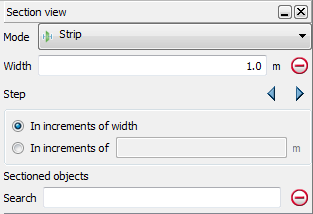
-
Define the required section plane using the action plane toolbar.
-
Adjust the Section width to display the desired width (use CTRL+ALT+right mouse button, or enter the value).
-
Adjust the Section offset to move the data displayed along the defined section plane (use CTRL+ALT+left mouse button). Using the left/right Section offset arrows will move the display by the amount entered into the Step field.
-
Close the section viewing tool to remove the section view and return to the full data display. The tool will remember the settings used last the next time it is launched.
