Visualisation
The Visualisation menu contains options to display status information on a hole.
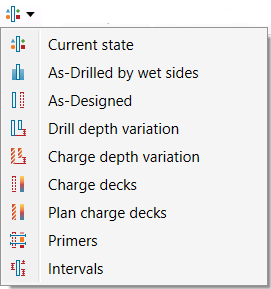
 Current state Current state |
Displays the status of holes (drilled, dipped, backfilled, etc.). Collars are shown at their drilled location (if drilled). The status colours are those defined in Hole properties ( Home > Setup >  Site ). Site ). |
 As-Drilled by wet sides As-Drilled by wet sides |
Displays information about the wet sides of dipped holes.
The colours are those defined in Water length colours (Home > Setup > Site > Report setup ). |
 As-Designed As-Designed |
Displays the status of holes (drilled, dipped, backfilled, etc.). Collars are shown at their designed location.
The status colours are those defined in Hole properties (Home > Setup > Site ). |
 Drill depth variation Drill depth variation |
Displays variation in drilled depth from the designed depth.
The colours are those defined in Report setup (Home > Setup > Site ). |
 Charge depth variation Charge depth variation |
Displays the variation in the charge depth from the designed depth. Holes that do not have sufficient information appear without a coloured cylinder.
The colours are those defined in Report setup (Home > Setup > Site ). |
 Charge decks Charge decks |
Displays the charge decks for each hole. Holes that do not have sufficient information appear without a coloured cylinder. The colours used are defined in the Blast Product Catalogue. |
 Plan charge decks Plan charge decks |
Displays charge decks for each hole according to their charge plan. |
 Primers Primers |
Displays the number of planned and loaded primers for each hole. |
 Intervals Intervals |
Displays the intervals for each hole. Holes with no intervals will appear without coloured cylinders.
The colours used are defined in Interval labels (Home > Setup >  Site). Site). |
