Hole
To view the context menu options for a hole, right-click on the hole in the view window.
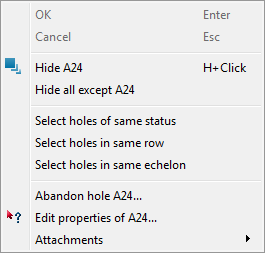
- Hide <hole name> hides the hole.
- Hide all except <hole name> hides all data in the view window except the selected hole.
- Select holes of same status selects every hole in the view window with the same status as the selected hole.
- Abandon <hole name> opens the Abandon hole panel. All pending entries will be cancelled if finalised by the user.
- Edit properties of <hole name> opens the Hole properties panel.
- Attachments menu options display any options added to the hole.
