Geometry
Source file: geometry.htm
The Geometry group on the Query ribbon contains tools to query information about a point or between two points.

 Point
Point
The Point tool allows you to query the geometry of a point in space.
To use the point tool, follow these steps:
-
On the Query ribbon, in the Geometry group, select
Point. -
Click the desired point in the view window. BlastLogic prints the geometric information in the view window and the report window.
 Distance
The Distance tool allows you to determine the distance between two points in space.
To use the distance tool, follow these steps:
-
On the Query ribbon, in the Geometry group, select
Distance. -
Click the first desired point in the view window.
-
Drag the mouse to the second desired point and click. BlastLogic prints the geometric information in the view window and the report window.
You can continue to query the distances between points by clicking different points in the view window.
-
Press Esc if you wish to quit the tool. Alternatively, if you wish to save the distance query, follow these steps:
-
Press Enter to open the Query Distance panel that allows you to export the distance as a text file (
.txt).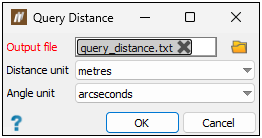
-
Click
 . The file explorer will appear.
 -
Select the location you wish to save the file to and click Save.
-
Optionally, edit the units using the Distance unit and Angle unit drop-downs.
-
Click OK to save the output file.
-
