System Administration Tool
The System Administration Tool allows you to create and manage sites, roles, and users.
To open this tool, navigate to the Home ribbon > Setup group, and select  System Administration Tool.
Sites
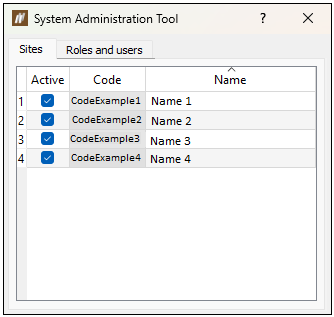
The Sites tab allows you to mark sites as active and inactive, using the Active column checkboxes. You can access only an active site to enter data.
Roles and users
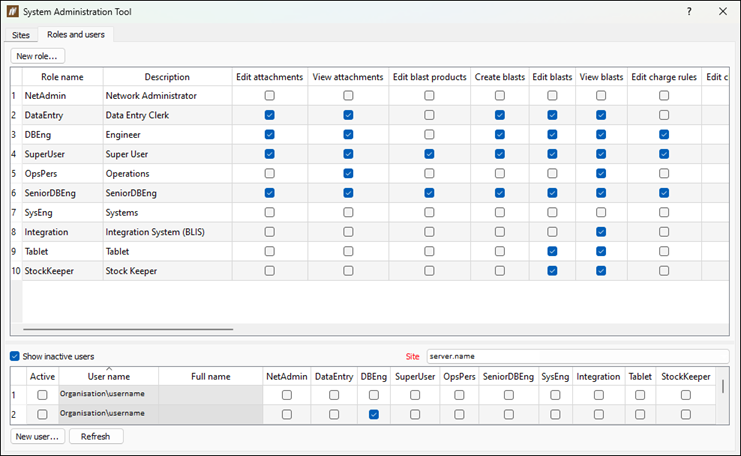
The Roles and users tab allows you to define users and their roles on site. The top table displays the roles, including nine default roles, and the bottom table displays the users.
Adding a new role
To add a new role, follow these steps:
-
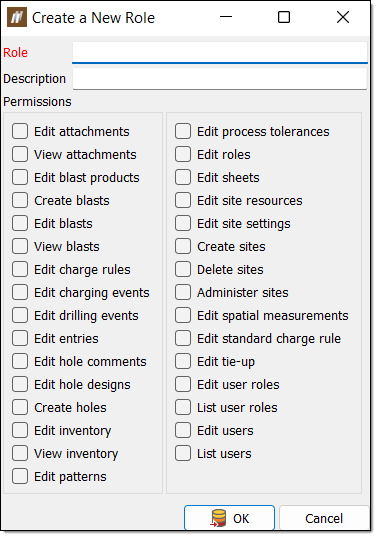
Click the New role... button at the top of the System Administration Tool panel. The Create a New Role panel will appear.
-
Enter the desired information into the Role and Description fields.
-
In the Permissions section, select the checkboxes of the permissions you wish to assign to this role.
-
Click OK. BlastLogic will add this new role into the table that lists the roles in the Roles and users tab.
-
Optionally, you can edit the permissions of the role by selecting or clearing the desired checkboxes in the role row of the table.
Adding a new user
To add a new user, follow these steps:
-
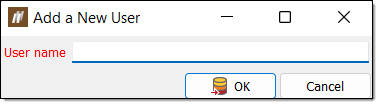
Select New user... at the bottom of the System Administration Tool panel. The Add a New User panel will appear.
-
Enter the name of the user into the User name field.
-
Click OK. BlastLogic will add the user to the table that lists the users in the Roles and users tab.
-
Edit the roles of the user by selecting the desired role checkboxes in the users table.
-
Optionally, you can mark a user as active or inactive by selecting or clearing the Active column checkbox.
