Random Colour by Tag
Source file: random-colour-by-tag.htm
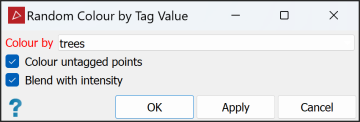
Random Colour by Tag Value... allows you to colour points differently, according to their attribute values. Each point in the selected data is coloured according to its value for the selected attribute. Untagged points may be coloured differently again.
To colour by tag value, do the following:
-
Select the data to be coloured in the project explorer.
-
On the Home ribbon tab, go to the Colour group. From the Colour Scheme drop-down list select
 Random Colour by Tag value....
 -
From the Colour by drop down list select the attribute for which points are to be re-coloured. In the image above, points will be coloured according to their trees tag values.
-
Select Colour untagged points if you also want the untagged points to be coloured.
-
Select Blend with intensity to add some colour variation based on the returned signal strength.
-
Click OK or Apply.
Note: You can repeat steps 3 to 6 to colour according to a different attribute's values. However, this will overwrite the previous colouring.
