Translate
Source file: translate-data.htm
Use this option to translate (shift) objects in various directions.
-
On the Edit ribbon tab, go to the Transform group and select
 Translate or in the
Position and Filter ribbon tab, go to the Transform group and select Translate.
Translate or in the
Position and Filter ribbon tab, go to the Transform group and select Translate.
-
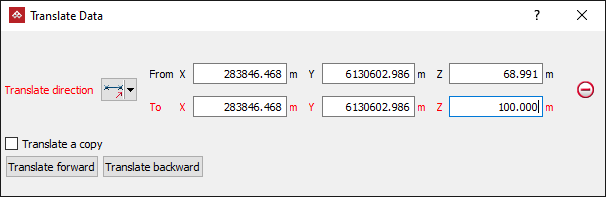
Select the method of defining the Translate direction from the drop-down list.
The panel will change to request additional inputs according to the selected Translate direction type. The Translate direction options are:
-
 Two points: Define the translation by specifying two points.
 -
 Two
points and distance: Define the direction by specifying two points and then define the distance to translate along that direction separately.
Two
points and distance: Define the direction by specifying two points and then define the distance to translate along that direction separately. -
 Facet
and distance: Pick as facet and then specify a distance to translate along the normal of that facet.
Facet
and distance: Pick as facet and then specify a distance to translate along the normal of that facet. -
 Axis
aligned and distance: Specify an axis and how far you want to move in that direction.
Axis
aligned and distance: Specify an axis and how far you want to move in that direction. -
 Bearing,
inclination and distance: Specify a bearing, inclination, and distance to translate.
Bearing,
inclination and distance: Specify a bearing, inclination, and distance to translate. -
 Action plane axis and distance Specify direction by choosing an axis of the current view's action plane (horizontally, vertically, or out of the action plane in its normal direction.) and then provide a distance to translate.
-
Tip: Right-clicking on the input fields will display a context menu with additional basic options.
-
Select the Translate a copy option to allow you to produce a copy of the selected objects located at the nominated direction and distance from the source.
-
Select the object to be translated in the project explorer and make sure that no other objects are highlighted.
-
Click Translate forward to perform the translation process. Use Transform backward to retrace the path back to the start position.
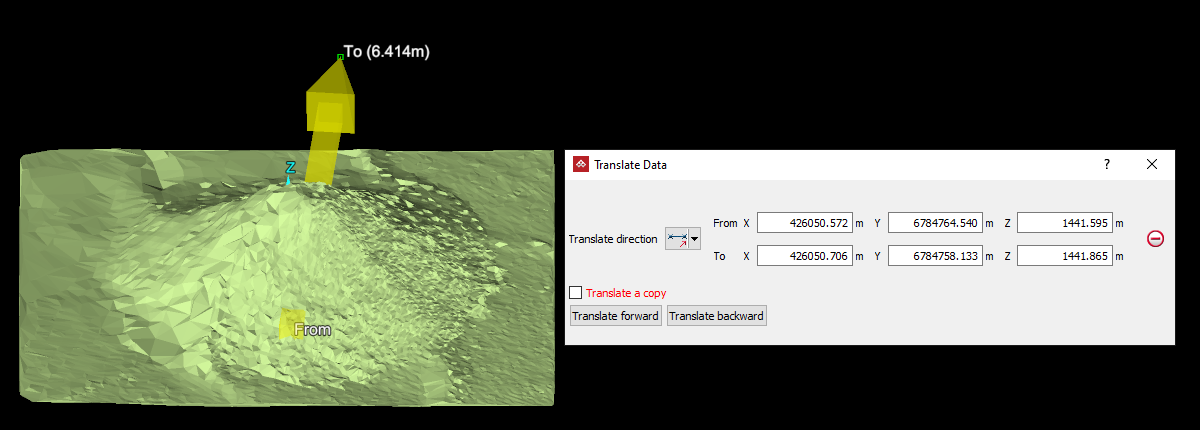
The direction vector guide
The direction vector is a visual aid
for these methods and is drawn as an arrow representing the direction
and distance to be translated. It is defined and used in the Two
point methods and can
be used in the axis aligned or
bearing/inclination methods. If
not used in the axis aligned or
bearing/inclination methods, there
is no visual guide for translation direction and distance. It is not used
in the Facet and distance method,
however, this method produces its own direction vector as a visual guide.