Solid
Source file: filter-by-solid.htm
Use Filter by solid to filter scan data
specified by a 3D solid shape and retain points inside or outside the
shape.
This is an extension of the Filter by polygon function. Whereas the Filter by polygon function can define a region based on a polygon and extruded into 3D space, the Filter by solid function allows full control in defining the 3D volume of interest. For example, this allows a more detailed capability in defining regions around caverns in underground mines.
-
Create or select a 3D solid shape to use.
-
On the Position and Filter ribbon tab, go to the Filter group. From the Filters drop-down list select
 Solid.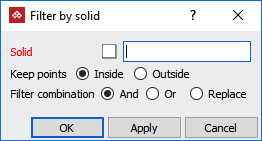
-
Drag the solid shape into the Solid field. The solid shape boundary is displayed in grey.
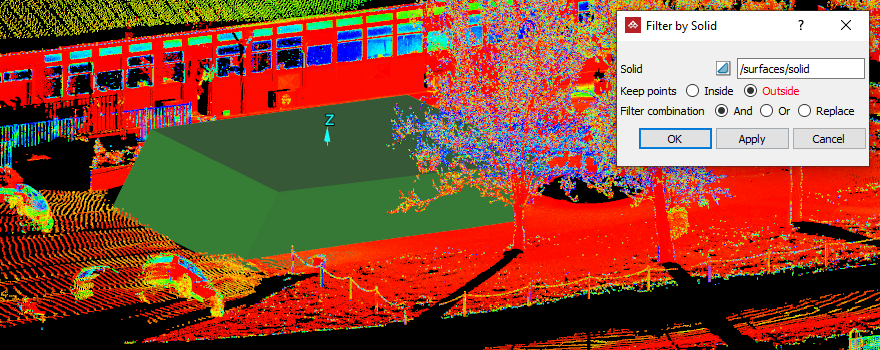
-
Choose to keep points Inside or Outside the solid shape.
-
Select the required Filter combination.
-
Select the scan data to filter.
-
Click OK or Apply.
Result of keeping the points outside of the solid.
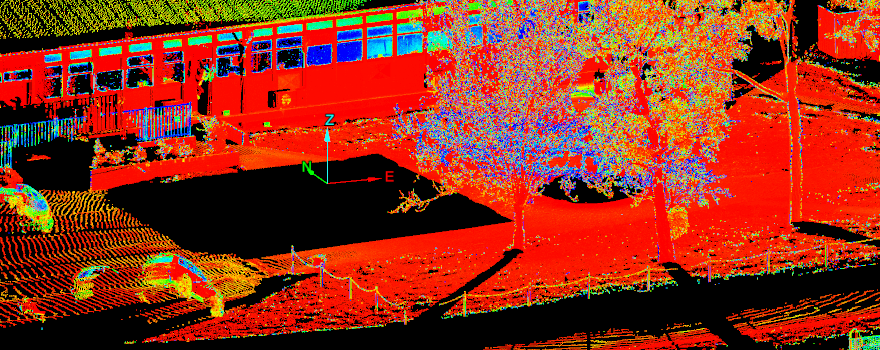
Tip: You can redisplay the points
hidden by the filter using the  Show All option. See Show All.
