Set Window
Source file: set-window.htm
The set window tool allows you to draw a window around a certain area on a stereonet.
The dimensions of the windowed area are defined by trend, plunge and spans around the trend and plunge.
To create a set window, proceed as follows:
-
Open a stereonet
 in a view window.
 -
On the Geotechnical ribbon tab, go to the Stereonet group and select
 Set Window.
The Set Window panel will open with all angle fields either set to zero if no discontinuity set has been selected, or pre-populated based on the selected discontinuity sets.
-
Select the discontinuities sets of interest. The angle fields will update according to the selected discontinuities.
-
Adjust the angle values as required.
-
Enter a Name for the window.
-
Choose a Colour for the window frame.
-
Choose a Destination stereonet to display the window.
-
Click OK or Apply.
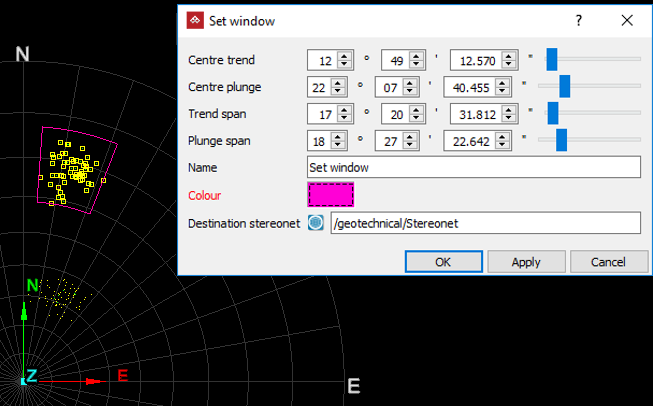
A stereonet with points (poles) selected and the resulting window drawn around them.
