Export Orthophoto
Source file: export-orthophoto.htm
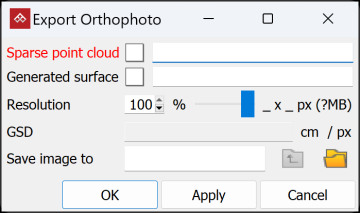
To create an orthographic image, click on the  Export Orthophoto button on the Photogrammetry ribbon tab, then follow the steps below.
-
Select the required Sparse point cloud and Generated surface in the project explorer.
-
Set the required Resolution with the slider. The dimensions, file size and GSD will be calculated and auto-populate.
-
Choose the Save image to location. Click
 and navigate to the required location. Click
  to navigate up one folder level.
 -
Click OK or Apply.
The orthophoto will be created in the chosen location as a .tiff file along with a .tfw file containing coordinate data.
