Point
Source file: query-a-point.htm
The point query
displays spatial information about a specific point in a scan or any other
data.
-
On the Query ribbon tab, go to the Geometry group and select
 Point.
This will launch the point dialog in the status bar.
- Click on the required point in the view window. Query Point Information is displayed in the view window and in the report window.
-
The process is repeatable until the cancel button is selected
 or the Esc key is pressed.
 -
Press Enter to complete the operation. A Query point summary will be generated in the report window and the Query point information panel will open.

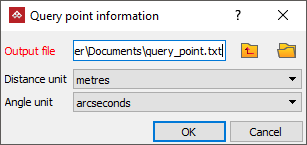



The Query point information
panel enables you to save all the point data summaries in a .txt
file in the specified location. The
project location is selected by default.
