Colour Scheme
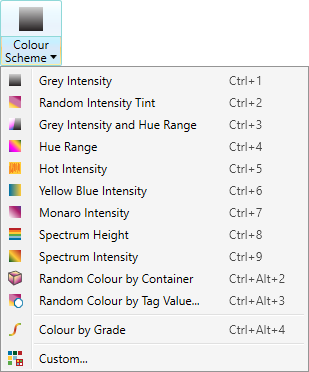
The colour schemes make use of intensity, range or height properties to colour and shade selected objects. These schemes are particularly useful for comparing objects, to highlight specific features (for example, geological features) or for presenting a more aesthetic appearance.
Note: Only scans have intensity and range characteristics. If a colour scheme that makes use of intensity or range is applied to an object other than a scan, the scheme will make use of height instead.
To apply a colour scheme
-
Select the data to be coloured.
-
On the Home ribbon tab navigate to the Colour group. From the Colour Scheme drop-down list select one of the schemes available.
Available Colour Schemes are:
-
Grey Intensity: Colour graded black to white on scan intensity or data height.
-
Random Intensity Tint: Applies a random colour to the data and is useful for distinguishing between numerous scans. More
-
Grey Intensity and Hue Range: Blend of intensity and range colouring for scan data.
-
Hue Range: Colour scan data range with spectrum.
-
Hot Intensity: Colour intensity with Heat colour scheme.
-
Yellow Blue Intensity: Colour intensity blended yellow to blue.
-
Monaro Intensity: Colour intensity blended purple to white.
-
Spectrum Height: Colour height with a spectrum.
-
Spectrum Intensity: Colour intensity with a spectrum.
-
Random Colour by Container: Colour all objects in a container a random colour but different colour per container.
-
Random Colour by Tag Value: Colour objects based on their attribute value. More
-
Colour by Grade: Colour a selected line by its inclination. More
-
Custom: Generate a custom colour scheme. More