Fixing a Surface
Use Fix surface to repair self-intersections
and inconsistent normals on surfaces.
- Select the surface(s) you want to repair.
- On the
Edit ribbon tab navigate to the Fix group and select
 Fix Surface.
A progress panel will
display and the surface(s) will be repaired.
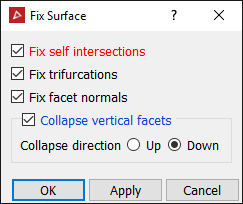
Fixing options are:
- Fix self intersections - Fix cases where the surface intersects itself.
- Fix trifurcations - Fix cases where the surface touches itself, creating a T-junction.
- Fix facet normals - Orient facet normals to point in the same direction (up for surface out for solids).
- Collapse vertical facets - Remove vertical facets and close the hole, this produces by moving the points along the bottom of the vertical region up or the points along the top down, adding points as necessary to neighbouring non-vertical facets to maintain a consistent surface.
-
Click OK or Apply.