Creating a Fitted Line
Used to fit
a line to a selection of points.
-
Using the point selection tool
 ,
select the group of points to have a line fitted.
,
select the group of points to have a line fitted. -
On the Create ribbon tab navigate to the Create group. From the Fit drop-down list select
 Fit Line.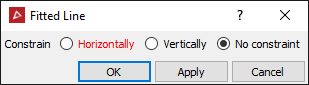
-
Select whether the line should be constrained Horizontally or Vertically. No constraint will use the best fit for the line.
-
Click OK or Apply. The line is saved in the cad container and is coloured the average colour of the selected points.