Querying Geometry (between points, lines & facets)
This function measures the angle and distance between points, lines and facets. The start and target objects can be different or same.
-
On the Query ribbon tab navigate to the Geometry group and select
 Geometry.
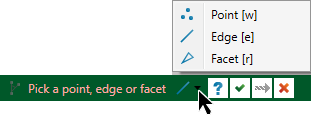
This will launch the query geometry dialog in the status bar.
-
Select the type of primitive (point, edge or facet) you want to measure from.
-
Manually enter the first geometric object to be measured from, or click in the desired location in the view window.
-
Manually enter the next geometric object to be measured, or click in the desired location in the view window. Use the text box to enter the name of the object you wish to select.
The distance is displayed on the screen and a summary of the measurement data is displayed in the Report Window.
Note: Snap modes are available for this operation.
-
Continue entering objects to be measured, or click
 cancel to complete
the operation.
cancel to complete
the operation.