To register scans by name
Scans acquired in the field using Maptek Gen 3 scanners are named according to the scan setup in a fixed naming convention:
survey-database-name_station-name_backsight-name_2xC4L_B_01
- 2x: scan speed (other options are 1x, 4x).
- C: scan type (C is combined (with photo) or R is range only).
- 4: scan resolution (1/2, 1, 2, 4, 8 or 16).
- L: scanner is level (within five degrees); U is displayed if not level.
- B: best point selection (other options are F first, L last, A all points).
- 01: scan number, will automatically increment with each scan
When scans have been acquired following this naming convention, once they have been imported, they can be registered to the survey reference stations.
Scan tolerances
Horizontal and vertical scan tolerances can be added to the survey data file as extra columns of data.
Note: Register by name requires that the survey database, station (scanner location) and backsight names exactly match the station labels and container name.
Note: To position the scans in the correct survey datum, the survey control points text file (set ups and backsights) must be stored in the survey container.
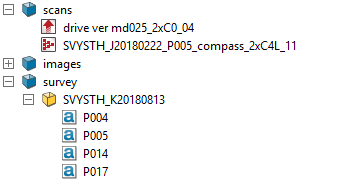
- Highlight all scans to be registered in the Explorer Window.
- Select Position and filter > Register and from the Register drop down list select
 By Name or the shortcut key F4
Tip: When checking the registration accuracy of scans, first colour them using the random intensity tint scheme (refer to Colour menu). This will assign a random colour to each scan, making it much easier to check the registration.