Add Plane
Source file: add-a-plane.htm
Adding a plane to a stereonet will result in a great circle and its pole being drawn.
Great circles can be used to visualise the orientation of the plane or joint set on a stereonet. A great circle can also be created from a cluster of projection poles and thus display an average plane for the cluster.
Note: Prior to creating great circles, a stereonet must be created.
-
Display the stereonet in a view window.
-
Display the fitted planes in a separate view window.
-
On the Geotechnical ribbon tab, go to the Stereonet group and select
 Add plane.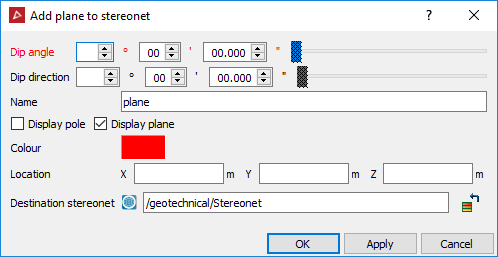
-
Using the facet selection type
 ,
highlight the plane or a discontinuity object to be used
to create the great circle. The Dip
angle and Dip direction
are automatically populated.
,
highlight the plane or a discontinuity object to be used
to create the great circle. The Dip
angle and Dip direction
are automatically populated. -
Select Display pole or Display plane.
-
Select a different Colour if desired.
-
Enter a Location for the plane, if desired.
-
Click OK or Apply.
Note: If more than one object is selected, the mean orientation is used.
The discontinuity is saved in the geotechnical container and added to the stereonet specified in the Destination stereonet field.
