Fit Circle
Source file: fitted-circle.htm
Use the fitted circle tool to fit a circle to a selection of points.
-
Using either the object
 or point
  selection type,
select the points to have a circle fitted.
selection type,
select the points to have a circle fitted.Tip: Use point selection type for a more precise fit to a specific area.
-
On the Create ribbon tab, go to the Create group. From the Fit drop-down list select
 Fit Circle.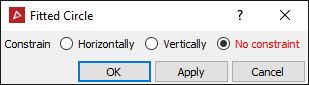
-
Select whether the circle should be constrained Horizontally or Vertically. No constraint will use the best fit to create the circle, regardless of orientation.
-
Click OK or Apply.
The fitted circle and its centre point are displayed in the view window, coloured the average colour of the selected points. They are also saved in the cad container.
