Polygon Textured
Use this option to create a polygon with a triangulation or texture image tiled over it. The polygon will be assigned a special primitive called $TRIANG.
This option can also be accessed by selecting the Textured Polygon button  from the Design toolbar.
Instructions
On the Design menu, point to Create, and then click Polygon Textured.
The following panel is then displayed.
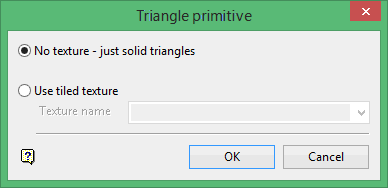
Note: If the current working layer has not been defined prior to selecting the Polygon Textured option, then the Allocate Layer panel will be displayed first.
 Allocate Layer panel
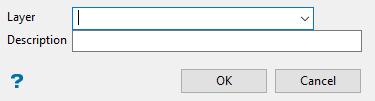
Name
Select the name of the layer from the Name drop-down list, or enter a new name to create a new layer. If you select an existing layer that is already loaded, subsequent digitising will be appended to this layer. If you select an existing layer that is not loaded, you will be prompted to specify whether you want to load the existing layer or overwrite its existing content.
Description
Enter a description of this layer. The description can contain up to 80 alphanumeric characters and can include spaces. If a description is not entered, a default description will be used instead. If the selected layer already has an assigned description, it displays when the layer is selected. Existing layer descriptions can be overwritten.
Click OK.
No texture
Select this option to draw polygons with solid shaded triangles.
Use tiled texture
Select this option to draw textured polygons using a nominated texture from the tiled texture resource file.
Click OK.
You will then need to digitise a polygon. Refer to the Polygon option if you require information on how to create a polygon.
Note: The texture image is switched on/off through using the Show Texture Properties button  on the Graphics toolbar.

