BlastLogic and Vulcan Integration
BlastLogic and Vulcan allow you to transfer and share data for the purpose of simplifying the drill and blast design iteration process. More specifically, live data editing allows you to share data between Vulcan and BlastLogic. The changes made in the former program are reflected in the latter while both applications are running.
Drill and blast file structure in Vulcan
Vulcan stores blast layers in the Vulcan design database file (.dgd.isis) structure. The dgd.isis file is accompanied by Vulcan design database index file (.dgd.isix). Layers stored in the dgd.isis file database can contain multiple blasts.
BlastLogic can import and export Vulcan blast data in a form of dgd.isis files. The Vulcan blast attributes (such as design depth, spacing, burden, and diameters) are also transferred along with the design collar locations. The associated polygons in the layers and Vulcan triangulation files (.00t) can also be imported into BlastLogic.
Note: Blasts in BlastLogic have to be published to be stored permanently in the BlastLogic database server. See Publishing a Blast for more information.
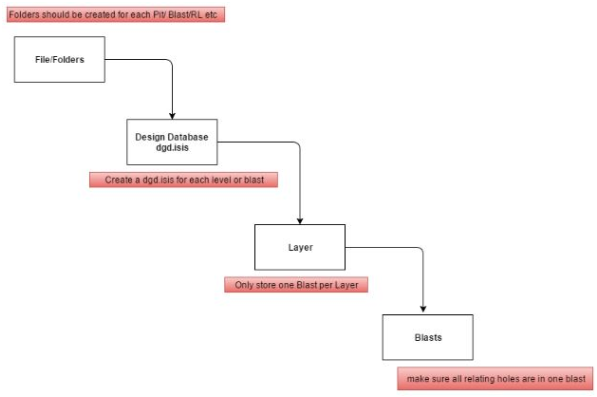
The Vulcan files are generally saved in a common network location, but the storage practices can vary between different sites. The diagram below shows the recommended blast organisation structure:
Blast specifications file
Vulcan blast specifications, which contain design templates, are saved as specifications.dab files and are usually located in the Vulcan working directory. These design templates are referenced when you create blast designs in Vulcan. BlastLogic needs the specifications.dab file to be present in the same folder as Vulcan design database file (.dgd.isis) to import design hole diameters, hole intervals, and loading styles.
Note: You can assign holes with different loading styles in Vulcan. Upon importing these holes to BlastLogic, you can map the loading styles to a published charge rule. This can streamline the process of applying the desired charge plans to the holes in BlastLogic. See Design for more information on charge rules, charge depths, charge plans, and tie-up designs.
Note: You can create multiple intervals for holes by the different rock types defined in Vulcan. You can then map these Vulcan intervals to intervals defined in BlastLogic. See Edit Intervals for information on adding sections to a hole in BlastLogic.
Sharing data between Vulcan and BlastLogic
Follow these steps to share data between applications:
-
Import the
dgd.isisfile into Vulcan. The file you have imported will appear in the Data menu. -
Right-click the imported object in the project explorer. The context menu will provide two sharing options:
-
Share with BlastLogic > As Blast: Opens the layer as one or more blasts in BlastLogic, in the
blastscontainer. -
Share with BlastLogic > As Geometry: Opens the geometry data inBlastLogic as a number of objects in the
layerscontainer.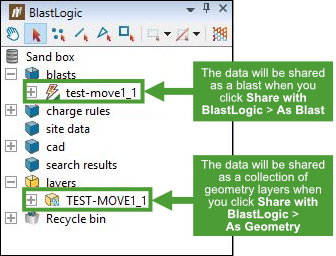
-
Editing blasts and layers in Vulcan
When you share Vulcan data with BlastLogic as a blast or a collection of geometry layers, and then make changes to that data in Vulcan, these changes will be reflected in the shared data in BlastLogic.
Note: The data can only be live edited when it is saved in the correct container (that is, a blast must be within the blasts container, and the geometry data must be within the layers container) and is unpublished.
Other operations
See the table below for more information on interoperability with Vulcan.
| Importing blasts with a Vulcan project file | Importing blasts with a Vulcan project file |
| Updating drillhole design | Updating Drillhole Design |
