maptek.vulcan.polyline
Interface for Vulcan design polylines.
To download all the example scripts on this page, click Python Polyline Example Scripts.
Note: A number of these functions use the maptek.vulcan_gui class. This class will import functions from the maptek.vulcan class when they are needed.
get_linetype(polyline self) → int_list
Gets the linetype as an integer list of indices (style, thickness).
# Filename: pl_get_linetype.py
# Purpose: Gets the linetype indices as a list [style, thickness].
# Returns: Int list.

from maptek import vulcan_gui

# use dynamic selection to select correct object
sel = vulcan_gui.selection("Select layer object.")
sel.criteria = ["LINE", "POLYGON"]  # limit selection to a polyline object
sel.single_object = True  # prevents selection prompt from asking more than once

for obj in sel:
    obj_name = obj.get_name()  # get name of object
    ltype = obj.get_linetype()  # get the linetype indices of each object

    print(f"{obj_name} pattern index: {ltype}")
set_linetype(polyline self, int_list & style)
Sets the linetype from a style and thickness.
When viewing this UI panel in Vulcan, you will notice that there are 8 columns corresponding to the pattern style, and 10 rows corresponding to the line thickness. However, recall that Python uses a zero-based index, so be sure to adjust your inputs parameters so that they match those shown in the image below.

# Filename: pl_set_linetype.py
# Purpose: Sets the linetype from a style and thickness.
# Returns: Void.

from maptek import vulcan_gui

# use dynamic selection to select correct object
sel = vulcan_gui.selection("Select layer object.")
sel.criteria = ["LINE", "POLYGON"]  # limit selection to a polyline object
sel.single_object = True  # prevents selection prompt from asking more than once

for obj in sel:
    obj.set_linetype([5,5])  # set linetype of current object
    sel.replace(obj)  # replaces the old object and preserves changes
get_pattern(polyline self) → int
Gets the pattern index of a polygon.
# Filename: pl_get_pattern.py
# Purpose: Gets the fill pattern index of a polygon.
# Returns: Integer.

from maptek import vulcan_gui

# select layer from the screen
sel = vulcan_gui.selection("Select Object")  # prompt for selection
sel.criteria = ["LINE", "POLYGON"]  # limit selection to a line

# get all polyline objects in the layer as an indexed list
for obj in sel:
    if obj.is_closed(): # checks that the object is a closed polygon, not a line
        obj_name = obj.get_name()  # get name of object
        pattern = obj.get_pattern()  # get the fill pattern index of the polygon

        print(f"{obj_name} : Pattern index: {pattern}")
set_pattern(polyline self, int pattern)
Sets the pattern index of a polygon. Indices range from 0 - 47.
# Filename: pl_set_pattern.py
# Purpose: Sets the pattern index of a line.
# Returns: Void.

from maptek import vulcan_gui

# select layer from the screen
sel = vulcan_gui.selection("Select objects to set pattern.")  # prompt for selection
sel.criteria = ["LINE", "POLYGON"]  # limit selection to a line

# get all polyline objects in the layer as an indexed list
for obj in sel:
    if obj.is_closed(): # checks that the object is a closed polygon, not a line
        obj_name = obj.get_name()  # get name of object
        pattern = obj.set_pattern(20)  # set the fill pattern index of the polygon
        sel.replace(obj)  # replaces the old object and preserves changes
append(polyline self, point pt) → bool
Adds a point to the end of a line.
# Filename: pl_append.py
# Purpose: Adds a point to the end of a line.
# Returns: Bool.

# In this case, vulcan_gui imports vulcan
# so, 'from maptek import vulcan' does not need to be called explicitly.
from maptek import vulcan_gui

dgd_file = "pydemo.dgd.isis"  # database to access
layer_name = "POLYLINES"  # layer to access

# new point [x,y,z,w,t,name]
# When t=1, then the new point will be connected to the line.
# If t=0, then just a point will be added to the object without connecting.
pt1 = [77360.0, 4560.0, 0.0, 0.0, 1, 'new_point']

# use dynamic selection to select correct line object
sel = vulcan_gui.selection("Select line to add point to.")
sel.criteria = ["LINE", "POLYGON"]  # limit selection to a line
sel.single_object = True  # prevents selection prompt from asking more than once

for obj in sel:
    print (f"Adding pt to: {obj.name}")  # report results to the user
    obj.append(pt1)  # add the new point to the line object
    sel.replace(obj)  # replaces the old object so changes are seen immediately
delete_point(polyline self, int k) → bool
Deletes a point from a line by using the index.
# Filename: pl_delete_point.py
# Purpose: Deletes a point from a line.
# Returns: Bool.

from maptek import vulcan_gui

# use dynamic selection to select correct line object
sel = vulcan_gui.selection("Select point to delete.")
sel.criteria = ['LINE', 'POLYGON']  # limit selection to a line
sel.single_object = True  # prevents selection prompt from asking more than once

for obj in sel:
    obj.delete_point(2)  # select the point to delete, in this case point 3 **

    '''

    ** Currently, there is not a method exposed to Python that allows
    users to select a specific point in a line.  To make sure you use the
    correct point index in the function call, right-click on the line in Vulcan,
    then select Label > Point Sequence.  Recall that Python uses a zero-based
    numbering scheme (0,1,2,3,...), so you will need to subtract 1 from the point
    number shown on the screen, then use it as the index in delete_point(index).

    '''

    sel.replace(obj)  # replaces the old object so changes are seen immediately
num_points(polyline self) → int
Returns the number of points in a polyline.
# Filename: pl_num_points.py
# Purpose: Get the number of points from a polyline.
# Returns: Integer.

from maptek import vulcan_gui

# select layer from the screen
sel = vulcan_gui.selection("Select Object")  # prompt for selection
sel.criteria = ["LINE", "POLYGON"]  # limit selection to a line
sel.single_object = True  # prevents selection prompt from asking more than once

for obj in sel:
    num_points = obj.num_points() # get the number of points

    # do something with the results...
    print(f"{num_points}")
get_coordinates(polyline self) → double_double_list
Gets a list of coordinates from a polyline in x/y/z.
# Filename: pl_get_coordinates.py
# Purpose: Get a list of coordinates of the points from a polyline.
# Returns: List.

from maptek import vulcan_gui

# select layer from the screen
sel = vulcan_gui.selection("Select Object")  # prompt for selection
sel.criteria = ["LINE", "POLYGON"]  # limit selection to a line
sel.single_object = True  # prevents selection prompt from asking more than once

for obj in sel:
    coords = obj.get_coordinates() # get [x,y,z] coordinates from selected object

    # do something with results...
    for points in coords:
        print(f"{points}")
set_coordinates(polyline self, point_list pl=None) → bool
Sets the coordinates of a line from a list of x/y/z or vulcan.point
# Filename: pl_set_coordinates.py
# Purpose: Create a line from a list of points.
# Returns: Bool.

from maptek import vulcan

dgd_file = "pydemo.dgd.isis"  # design database to access
layer_name = "POINTS"  # layer to access
points = [[75912.0, 3797.0, 0.0],
          [76707.0, 3693.0, 0.0],
          [77476.0, 3523.0, 0.0],
          [78428.0, 3523.0, 0.0],
          [79496.0, 3901.0, 0.0],
          [80252.0, 4214.0, 0.0],
          [80813.0, 4553.0, 0.0],
          [81438.0, 5048.0, 0.0]]

 with vulcan.dgd(dgd_file, "w") as dgd:  # open up the database in write mode
    if dgd.is_layer(layer_name):
        layer = dgd.get_layer(layer_name)  # get layer
        print('Layer exists')
    else:
        layer = vulcan.layer(layer_name)  # create a new layer
        print('new layer created')

    line = vulcan.polyline(points)  # create new polyline object

    line.set_coordinates(points)  # set the coordinates of a line

    line.set_connected()  # connect the points
    line.set_colour(5)  # give the line a colour
    layer.append(line)  # add line layer
    dgd.save_layer(layer)  # save layer
set_connected(polyline self, int const start=-1, int const end=-1, bool connected=True)
Sets the connection of a polyline.
Format: set_connected(start pt, end pt, connection on or off)
Note: You must call set_connected() for each section you want to connect. Indices correspond to point sequence numbers, which can be seen by
right-clicking on object, then selecting Label > Point sequence.
# Filename: pl_set_connected.py
# Purpose: Connect points in a line.
# Returns: None.

from maptek import vulcan_gui

# use dynamic selection to select correct object
sel = vulcan_gui.selection("Select layer object.")
sel.criteria = ["LINE", "POLYGON"]  # limit selection to a polyline object

# You must call set_connected() for each section you want to connect.
# Indices correspond to point sequence numbers, which can be seen by
# right-clicking on object, then selecting Label > Point sequence.

for obj in sel:
    # connect first section
    obj.set_connected(3,6,True)  # (start pt, end pt, connection on or off)

    # connect a different section
    obj.set_connected(8,10,True)  # (start pt, end pt, connection on or off)

    sel.replace(obj)  # replaces the old object so changes are seen immediately
is_clockwise(polyline self) → bool
Returns true if the polyline is clockwise.
# Filename: pl_is_clockwise.py
# Purpose: Checks if the polyline is clockwise.
# Returns: Bool.

from maptek import vulcan_gui

# use dynamic selection to select correct object
sel = vulcan_gui.selection("Select layer object.")
sel.criteria = ["LINE", "POLYGON"]  # limit selection to a polyline object

for obj in sel:
    obj_name = obj.get_name() # get name of object
    clockwise = obj.is_clockwise()  # check if clockwise

    print(f"{obj_name} clockwise: {clockwise}")
set_direction(polyline self, int const dir=0)
Sets the direction of a polyline.
Input: 0 = clockwise, 1 = counter clockwise
# Filename: pl_set_direction.py
# Purpose: Sets the direction of a polyline.
# Returns: None.

from maptek import vulcan_gui

# use dynamic selection to select correct object
sel = vulcan_gui.selection("Select layer object.")
sel.criteria = ["LINE", "POLYGON"]  # limit selection to a polyline object
sel.single_object = True  # prevents selection prompt from asking more than once

for obj in sel:
    obj_name = obj.get_name()  # get name of object
    dir = obj.set_direction(0)  # 0 = clockwise, 1 = counter clockwise

    clockwise = obj.is_clockwise()  # check if clockwise

    print(f"{obj_name} clockwise: {clockwise}")
make_clockwise(polyline self)
Makes a polyline clockwise.
# Filename: pl_make_clockwise.py
# Purpose: Makes a polyline clockwise.
# Returns: None.

from maptek import vulcan_gui

# use dynamic selection to select correct object
sel = vulcan_gui.selection("Select layer object.")
sel.criteria = ["LINE", "POLYGON"]  # limit selection to a polyline object
sel.single_object = True  # prevents selection prompt from asking more than once

for obj in sel:
    obj_name = obj.get_name()  # get name of object
    obj.make_counter_clockwise()  # set polyline to counter clockwise

    # report direction
    if obj.is_clockwise():
        print(f'{obj_name} is clockwise.')
    else:
        print(f'{obj_name} is counter-clockwise.')
make_counter_clockwise(polyline self)
Makes a polyline counter clockwise.
# Filename: pl_make_counter_clockwise.py
# Purpose: Makes a polyline counter clockwise.
# Returns: None.

from maptek import vulcan_gui

# use dynamic selection to select correct object
sel = vulcan_gui.selection("Select layer object.")
sel.criteria = ["LINE", "POLYGON"]  # limit selection to a polyline object
sel.single_object = True  # prevents selection prompt from asking more than once

for obj in sel:
    obj_name = obj.get_name() # get name of object
    obj.make_counter_clockwise()  # set polyline to counter clockwise

    # report direction
    if obj.is_clockwise():
        print(f'{obj_name} is clockwise.')
    else:
        print(f'{obj_name} is counter-clockwise.')
is_closed(polyline self) → bool
Returns true if a polyline is closed.
# Filename: pl_is_closed.py
# Purpose: Checks if the polygon is closed.
# Returns: Bool.

from maptek import vulcan_gui

# use dynamic selection to select correct object
sel = vulcan_gui.selection("Select layer object.")
sel.criteria = ["LINE", "POLYGON"]  # limit selection to a polyline object
sel.single_object = True  # prevents selection prompt from asking more than once

for obj in sel:
    obj_name = obj.get_name()  # get name of object
    state = obj.is_closed()  # check if the polygon is closed

    print(f"{obj_name} closed: {state}")
set_closed(polyline self, bool closure=True)
Sets the polyline to closed.
# Filename: pl_set_closed.py
# Purpose: Sets the polyline to closed.
# Returns: None.

from maptek import vulcan_gui

# use dynamic selection to select correct object
sel = vulcan_gui.selection("Select layer object.")
sel.criteria = ["LINE", "POLYGON"]  # limit selection to a polyline object
sel.single_object = True  # prevents selection prompt from asking more than once

for obj in sel:
    obj.set_closed(True)  # closes polygon
    sel.replace(obj)  # replaces the old object and preserves changes
shift(polyline self, double const & x, double const & y, double const & z)
Shifts a polyline by an x/y/z distance.
# Filename: pl_shift.py
# Purpose: Shift the entire polyline by an x/y/z distance.
# Returns: None.

from maptek import vulcan_gui

# use dynamic selection to select correct object
sel = vulcan_gui.selection("Select layer object.")
sel.criteria = ["LINE", "POLYGON"]  # limit selection to a polyline object
sel.single_object = True  # prevents selection prompt from asking more than once

x,y,z = 200.0,200.0,0.0  # x/y/z shift distance

for obj in sel:
    obj.shift(x, y, z)  # shift polygon by x,y,z distance
    sel.replace(obj)  # replaces the old object and preserves changes
scale(polyline self, double const & factor, point center=None)
Scales a polyline based on a scale and center point.
# Filename: pl_scale.py
# Purpose: Scales a polyline based on a scale and center point.
# Returns: None.

from maptek import vulcan_gui

# use dynamic selection to select correct object
sel = vulcan_gui.selection("Select layer object.")
sel.criteria = ["LINE", "POLYGON"]  # limit selection to a polyline object
sel.single_object = True  # prevents selection prompt from asking more than once

for obj in sel:
    obj.scale(2, obj.centroid())  # scale by factor 2 at centroid location
    sel.replace(obj)  # replaces the old object and preserves changes
planar_area(polyline self, bool plan=True) → double
Gets the planar area of a polyline (in plan or a best fit plane).
# Filename: pl_planar_area.py
# Purpose: Gets the planar area of a polyline (in plan or a best fit plane).
# Returns: Double.

from maptek import vulcan_gui

# use dynamic selection to select correct object
sel = vulcan_gui.selection("Select layer object.")
sel.criteria = ["LINE", "POLYGON"]  # limit selection to a polyline object
sel.single_object = True  # prevents selection prompt from asking more than once

for obj in sel:
    result = obj.planar_area(True)  # True = plan view, False = not plan view

    print(f"Area: {result}")
length(polyline self, bool plan=False) → double
Gets the length of a polyline (in plan or 3D).
# Filename: pl_length.py
# Purpose: Gets the length of a polyline (in plan or 3D).
# Returns: Double.

from maptek import vulcan_gui

# use dynamic selection to select correct object
sel = vulcan_gui.selection("Select layer object.")
sel.criteria = ["LINE", "POLYGON"]  # limit selection to a polyline object
sel.single_object = True  # prevents selection prompt from asking more than once

for obj in sel:
    result = obj.length(True)  # True = plan view, False = not plan view

    print(f"Length: {result}")
centroid(polyline self) → point
Gets the centroid of a polyline.
# Filename: pl_centroid.py
# Purpose: Gets the centroid of a polyline.
# Returns: Point.

from maptek import vulcan_gui

# use dynamic selection to select correct object
sel = vulcan_gui.selection("Select layer object.")
sel.criteria = ["LINE", "POLYGON"]  # limit selection to a polyline object
sel.single_object = True  # prevents selection prompt from asking more than once

for obj in sel:
    obj_name = obj.get_name()  # get name of object
    pt = obj.centroid()  # get the centroid of a polyline.

    print(f"Centroid of {obj_name}: {pt}")
center_average(polyline self) → point
Gets the center of a polyline by an average of the points.
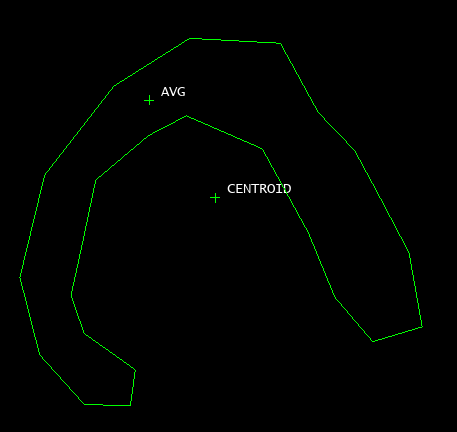
The center_average() function differs from centroid() in that it will locate a point that should (though it is not guaranteed) be within a close polygon.
The function centroid() locates a point in the centre of all points that belong to the selected object, whether they are part of a closed polygon or not.
# Filename: pl_center_average.py
# Purpose: Gets the center of a polyline by an average of the points.
# Returns: Point.

from maptek import vulcan_gui

# use dynamic selection to select correct object
sel = vulcan_gui.selection("Select layer object.")
sel.criteria = ["LINE", "POLYGON"]  # limit selection to a polyline object
sel.single_object = True  # prevents selection prompt from asking more than once

for obj in sel:
    obj_name = obj.get_name()  # get name of object
    pt = obj.center_average()  # get the center average of a polyline

    print(f"Center average {obj_name}: {pt}")
change_xyz(polyline self) → point
Get the change in x/y/z directions between the start and end points of a polyline.
Note: This function measures the difference between the start and end points of a polyline. Therefore, the results will always be zero when a closed polygon is selected since the two points are coincident.
# Filename: pl_change_xyz.py
# Purpose: Get the change in x/y/z directions between the start and end points of a polyline.
# Returns: Point.

from maptek import vulcan_gui

# use dynamic selection to select correct object
sel = vulcan_gui.selection("Select layer object.")
sel.criteria = ["LINE", "POLYGON"]  # limit selection to a polyline object
sel.single_object = True  # prevents selection prompt from asking more than once

for obj in sel:
    obj_name = obj.get_name()  # get name of object

    change = obj.change_xyz()  # get the change

    sel.replace(obj)  # replaces the old object and preserves changes
    print(f"{obj_name}: Change in x,y,z: {change}")
filter(polyline self, double distance)
Filters a polyline by a distance tolerance.
# Filename: pl_filter.py
# Purpose: Filters a polyline by a distance tolerance.
# Returns: None.

from maptek import vulcan_gui

# use dynamic selection to select correct object
sel = vulcan_gui.selection("Select layer object.")
sel.criteria = ["LINE", "POLYGON"]  # limit selection to a polyline object
sel.single_object = True  # prevents selection prompt from asking more than once

for obj in sel:
    obj.filter(50)  # filter by distance tolerance

    sel.replace(obj)  # replaces the old object and preserves changes
point_inside(polyline self, point pt, bool plan=True) → bool
Returns true if a point is inside the polyline.
# Filename: pl_point_inside.py
# Purpose: Returns true if a point is inside the polyline.
# Returns: Bool.

from maptek import vulcan_gui

# use dynamic selection to select correct object
sel = vulcan_gui.selection("Select layer object.")
sel.criteria = ["LINE", "POLYGON"]  # limit selection to a polyline object
sel.single_object = True  # prevents selection prompt from asking more than once

pt = [79577.67779822588,4890.435805968996,0.0,0.0,0,'']

for obj in sel:
    obj_name = obj.get_name()  # get name of object

    loc = obj.point_inside(pt)  # check location of point

    print(f"Point inside {obj_name}: {loc}")
linetype
Polyline linetype
# Filename: pl_linetype.py
# Purpose: Polyline linetype.

from maptek import vulcan_gui

# use dynamic selection to select correct object
sel = vulcan_gui.selection("Select layer object.")
sel.criteria = ["LINE", "POLYGON"]  # limit selection to a polyline object
sel.single_object = True  # prevents selection prompt from asking more than once

for obj in sel:
    obj_name = obj.get_name()  # get name of object

    # get linetype property from selected object
    ltype = obj.linetype
    print(f"{obj_name}: {ltype}")

    # assign linetype property to selected object
    obj.linetype = [0,1]  # [style, thickness]
    sel.replace(obj)  # replaces the old object and preserves changes
pattern
Polyline pattern
# Filename: pl_pattern.py
# Purpose: Polyline pattern.

from maptek import vulcan_gui

# use dynamic selection to select correct object
sel = vulcan_gui.selection("Select layer object.")
sel.criteria = ["LINE", "POLYGON"]  # limit selection to a polyline object
sel.single_object = True  # prevents selection prompt from asking more than once

for obj in sel:
    obj_name = obj.get_name()  # get name of object

    # get pattern property from selected object
    patt = obj.pattern
    print(f"{obj_name}: {patt}")

    # assign pattern property to selected object
    assert obj.is_closed(), 'Error: Object is not closed polygon.'
    if obj.is_closed():
        obj.pattern = 40  # pattern index
        sel.replace(obj)  # replaces the old object and preserves changes
closed
Polyline closure (bool)
True = close, False = open
# Filename: pl_closed.py
# Purpose: Used for polygon closure.

from maptek import vulcan_gui

# use dynamic selection to select correct object
sel = vulcan_gui.selection("Select closed polygon.")
sel.criteria = ["LINE", "POLYGON"]  # limit selection to a polyline object
sel.single_object = True  # prevents selection prompt from asking more than once

for obj in sel:
    obj_name = obj.get_name()  # get name of object

    # get closure state of selected object
    state = obj.closed
    print(f"{obj_name}: {state}")

    # set closure state of selected object
    obj.closed = True  # close polygon: (True = close, False = open)
    sel.replace(obj)  # replaces the old object and preserves changes

    # report closure state
    if obj.is_closed():
        print(f'{obj_name} is closed.')
    else:
        print(f'{obj_name} is not closed.')
clockwise
Polyline direction (bool)
# Filename: pl_clockwise.py
# Purpose: Used for polygon direction.

from maptek import vulcan_gui

# use dynamic selection to select correct object
sel = vulcan_gui.selection("Select closed polygon.")
sel.criteria = ["LINE", "POLYGON"]  # limit selection to a polyline object
sel.single_object = True  # prevents selection prompt from asking more than once

for obj in sel:
    obj_name = obj.get_name()  # get name of object

    # get direction of selected object
    state = obj.clockwise
    print(f"{obj_name}: {state}")

    # set direction of selected object
    obj.clockwise = 0  # 0 = clockwise, 1 = counter clockwise
    sel.replace(obj)  # replaces the old object and preserves changes

    # report direction
    if obj.is_clockwise():
        print(f'{obj_name} is clockwise.')
    else:
        print(f'{obj_name} is counter-clockwise.')
coordinates
Polyline coordinates
# Filename: pl_coordinates.py
# Purpose: Used for polygon coordinates.

from maptek import vulcan_gui

# use dynamic selection to select correct object
sel = vulcan_gui.selection("Select closed polygon.")
sel.criteria = ["LINE", "POLYGON"]  # limit selection to a polyline object
sel.single_object = True  # prevents selection prompt from asking more than once

for obj in sel:
    obj_name = obj.get_name()  # get name of object

    # get coordinates of selected object
    coord_list = obj.coordinates
    print(f"{obj_name}: {coord_list}")

    # set coordinates of selected object
    coord_list = [[74000.0, 4400.0, 0.0],
                  [73300.0, 3600.0, 0.0],
                  [73300.0, 5300.0, 0.0]]

    obj.coordinates = coord_list  # assign new coordinates to line

    # connect points in line
    num_points = obj.num_points() # get the number of points
    obj.set_connected(0,num_points,True)  # (start pt, end pt, connection on or off)
    sel.replace(obj)  # replaces the old object and preserves changes

