Triangulation Settings
Use the Triangulation Settings option to choose the solid triangulations that represent the targeted stopes for reserving.
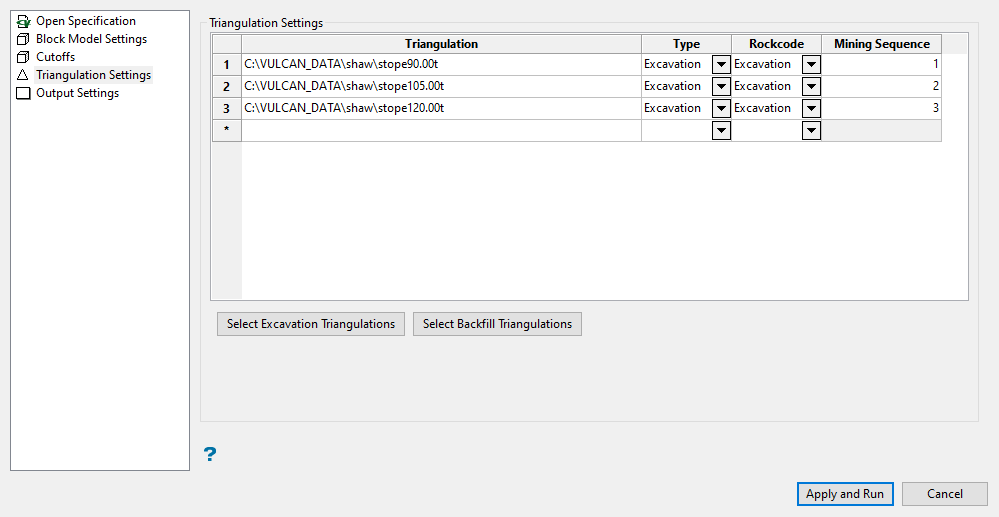
Triangulation Settings
Triangulation
Triangulations can be selected either interactively by clicking the triangulations loaded on the screen, or from the drop-down listing. Select the Excavation and Backfill triangulations that represent targeted reserve stopes. Click Browse to select a file from another location.
Type
Select the type of triangulation to use for the block model. Note that the type of triangulations available from the drop-down (that is, Excavation or Backfill), may vary depending on the option specified when the solid triangulations were chosen. Excavation and Backfill are the most common.
If Excavation has been chosen, reserves for that triangulation will be calculated and reported. If Backfill has been chosen, the reserves report will account for the mass and volume of material mined (using the value entered in the Backfill/Waste density field in the Block Model Settings option), however no grade or value will be reported.
Rock Code
Enter or select a description for the excavation or backfill material. The default is the initial Type value for the selected triangulation.
Mining Sequence
All triangulations that have been defined (in the Type column) as being an Excavation type require a mining sequence definition. Enter the number corresponding to the mining sequence for each Excavation triangulation.
Select Excavation Triangulations / Select Backfill Triangulation
These buttons can be used to select loaded triangulations directly from the screen.
Note: Triangulations should be chosen by the sequence in which they are to be mined. If necessary, the Mining Sequence column can be used to manually change the mining order.
Related topics

