To apply dip and strike colour
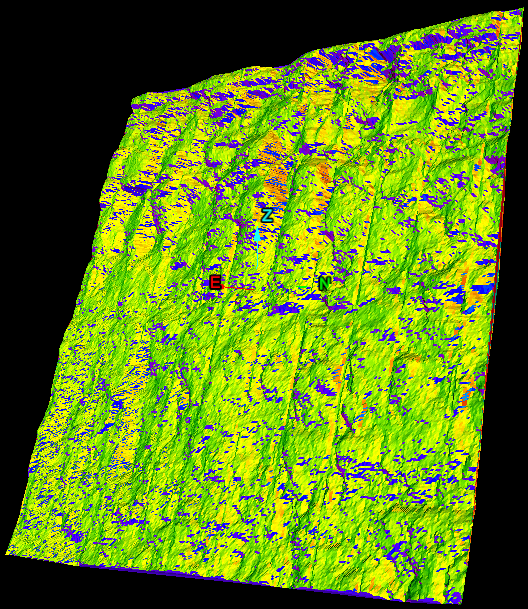
Colour by dip and strike colours facet networks based on the dip or strike values of the individual facets. This helps to highlight discontinuities and planar areas and makes it easy to see fractures.
This tool is a preliminary way of marking exposed discontinuities. The resulting information may be used for further analysis using the geotechnical tools.
Note: For accurate colouring of dip and strike,
the triangulation used must be created using spherical,
scan triangulation or a fusion surface. Topographic
triangulations are not suitable for geotechnical analysis as they are
created in a top-down manner that does not provide sufficient detail on
rock slopes.
-
Select Geotechnical > Colour >
 Colour Dip and Strike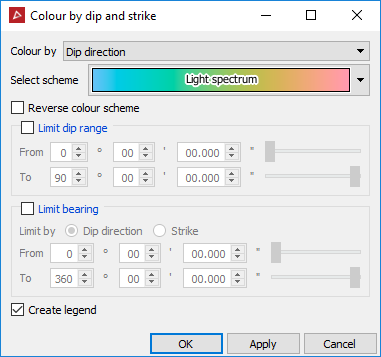
-
Select whether to Colour by dip or strike.
-
Select the colour scheme from the drop-down list. The options will vary depending on whether dip or strike is selected in the Colour by field.
The From and To dip and strike fields may be used to limit the colouring to a particular set. This highlights which fractures are part of the same set.
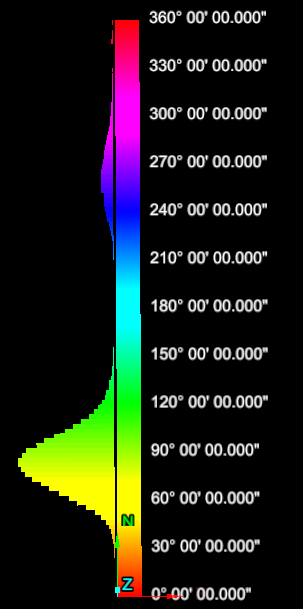
Selecting the Create legend checkbox creates a secondary container named Colour by dip and strike legend. This contains a histogram that shows the colour at a particular dip/strike and the distribution of dip/strike values.