To create a spherical triangulation
A spherical
triangulation is similar to  topographic
triangulation, but instead of the triangulation being a 2D surface
in the XY plane, it is a 2D surface on a sphere. As the triangulation
grid is spherical from the origin point specified in the dialog, this
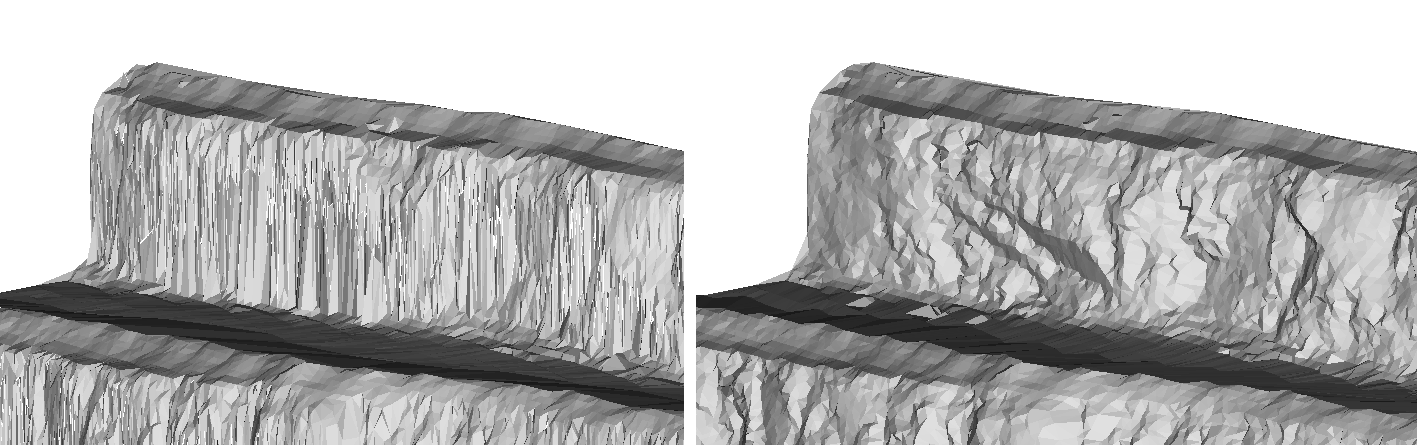
option is very useful for allowing overhanging surfaces to be made.
topographic
triangulation, but instead of the triangulation being a 2D surface
in the XY plane, it is a 2D surface on a sphere. As the triangulation
grid is spherical from the origin point specified in the dialog, this
option is very useful for allowing overhanging surfaces to be made.
This option
is used once scans have been registered (using  Register
Scans by Name,
Register
Scans by Name,  Matching Point
Pairs or
Matching Point
Pairs or  Translate /
  Rotate) and filtered (using
  Polygon,
 Isolated Points,
  Topography
and
Topography
and  Intensity).
-
Put the scan in plan view.
-
Select Create > Surface
 Spherical Surface / Triangulation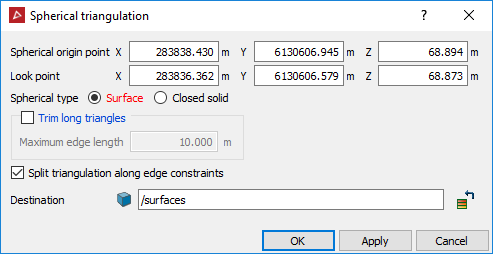
-
Enter a value or click in the View window to select the Spherical origin point. This is the centre point for the triangulation.
-
Enter a value or click in the View window to select the Look point. The origin and look point are displayed in the View window.
-
Rotate the view so that it is side on.
-
Alter the Z of the Spherical origin point so that the red arrow is perpendicular to the wall.
Note: If you are modelling only one scan, the Spherical origin and Look points are automatically set to the origin of the scan and backsight direction.
- Spherical type allows the user to specify whether the resulting surface should be an open surface or a closed surface. Trim long triangles eliminates long, incorrectly generated triangles. A maximum edge length is specified, which prevents triangles greater than this being created.
- Split triangulation along edge constraints splits the triangulation into separate objects based on any lines or polygons highlighted in the Explorer window when the triangulation is created. This option may be of use as a 'cookie cutter' when producing windows or a mine portal.
- Ensure the scan data is highlighted in the Explorer window and click OK.
The triangulation is saved in the surfaces container by default.
Note: Once the triangulation
has been created, it may require minor editing via Edit >  Despike.
The example below shows a topographic triangulation on the left and a spherical triangulation on the right.