To create a topographic triangulation
Used to create triangulations (surfaces) of a group of scans.
This function
works in the XY plane, that is, it triangulates straight down. This means
that if there are areas of undercut walls, these will not be modelled
accurately (in this case, use  Spherical
Triangulation).
Spherical
Triangulation).
This option
is used once scans have been registered (using  Register
Scans by Name,
Register
Scans by Name,  Matching Point
Pairs or
Matching Point
Pairs or  Translate or
  Rotate) and filtered (using
  Polygon,
  Isolated Points,
  Topography
and
Topography
and  Intensity).
-
Select Create > Surface >
 Topographic Surface / Triangulation
- Trim boundary triangles eliminate long, incorrectly generated boundary triangles. A maximum length is specified, which prevents triangles greater than this being created.
Note: This option is only applicable to boundary triangles; large voids in the centre of the data will still be modelled.
- Single surface creates a single surface from the selected objects/scans.
- Single surface per object creates a single surface for each selected object/scan.
- Relimit to polygon constrains the model to a polygon, for example a pit boundary.
- Split triangulation along edge constraints splits the triangulation into separate objects based on any lines or polygons highlighted in the Explorer window when the triangulation is created.
- Ensure the scan data is highlighted in the Explorer window.
- Click OK.
The triangulation is saved in the surfaces container by default.
Note: Once the triangulation
has been created, it may require minor editing via Edit >  Despike.
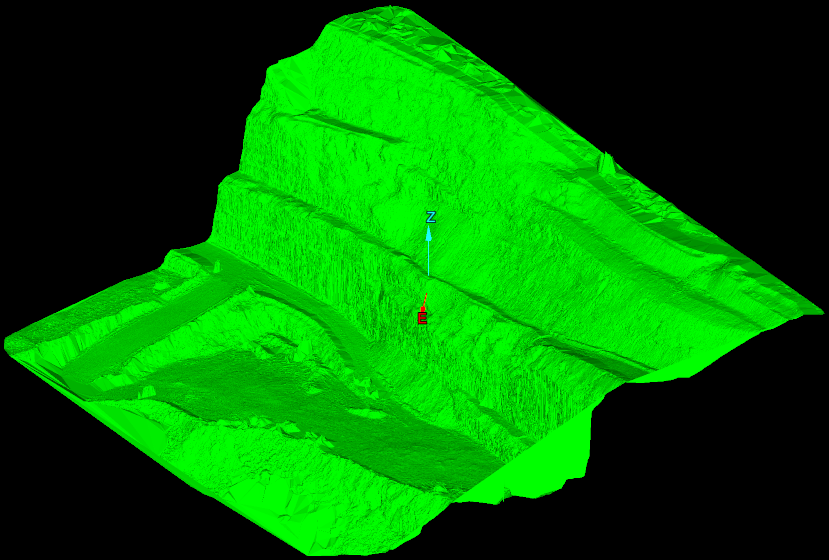
The example
below shows a topographic triangulation of a pit Relimited to a polygon.