Hole
The Hole context sensitive ribbon contains tools specifically related to holes.

Edit
Hole Properties
For information on the Hole Properties tool, see the Hole properties section on the hole page.
Multiple Hole Properties
For information on the Multiple Hole Properties tool, see the Multiple hole properties section on the hole page.
Abandon holes
An abandoned hole is not considered to be 'fired' with the blast, despite still being associated with the blast.
-
A published hole cannot be abandoned if there is 'loaded' or 'reconciled' explosive data recorded to that hole.
-
Holes that are abandoned that have unsynchronised load data recorded to them will resume an active state when the device next synchronises.
To abandon a set of holes, follow these steps:
-
Select the holes to be abandoned.
-
Go to Hole > Edit > Abandon Holes.The following panel is displayed.
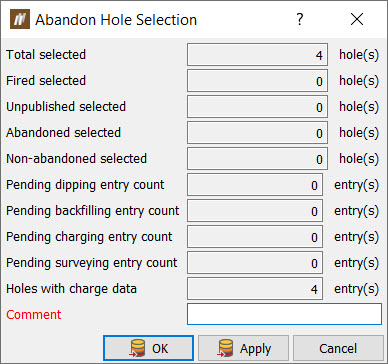
The panel shows the number of holes to be abandoned and any pending entries which will be cancelled as a result of the holes being abandoned.
-
Enter a comment and click OK or Apply. A confirmation message will be displayed summarising the holes and entries to be abandoned and cancelled.
-
Click Yes to continue.
Hole Intervals
For information on the Hole Intervals tool, see the Edit intervals section on the hole page.
Assign Holes to Blast
For information on assigning holes to a blast, see Assign Holes to Blast.
Query
Hole Tabular View
For information on the Hole Tabular View tool, see the Hole tabular view section on the hole page.
Properties
For information on the Properties tool, see the Properties section on the data page.
Charge
Apply Charge Rule
For information on applying a charge rule, see Applying a charge rule.
Update Charge Plans
For information on updating charge plans, see Update Charge Plans.
Attachments
Browse Attachments
For information on the Browse Attachments tool, see the Browse Attachments section on the attachment page
Open Attachment
The Open Attachment tool allows you to view and open attachments associated with a single hole. Select the tool drop-down to view the attachments and select the desired attachment to open it in a new view window.

