Regions, Groups, and Units
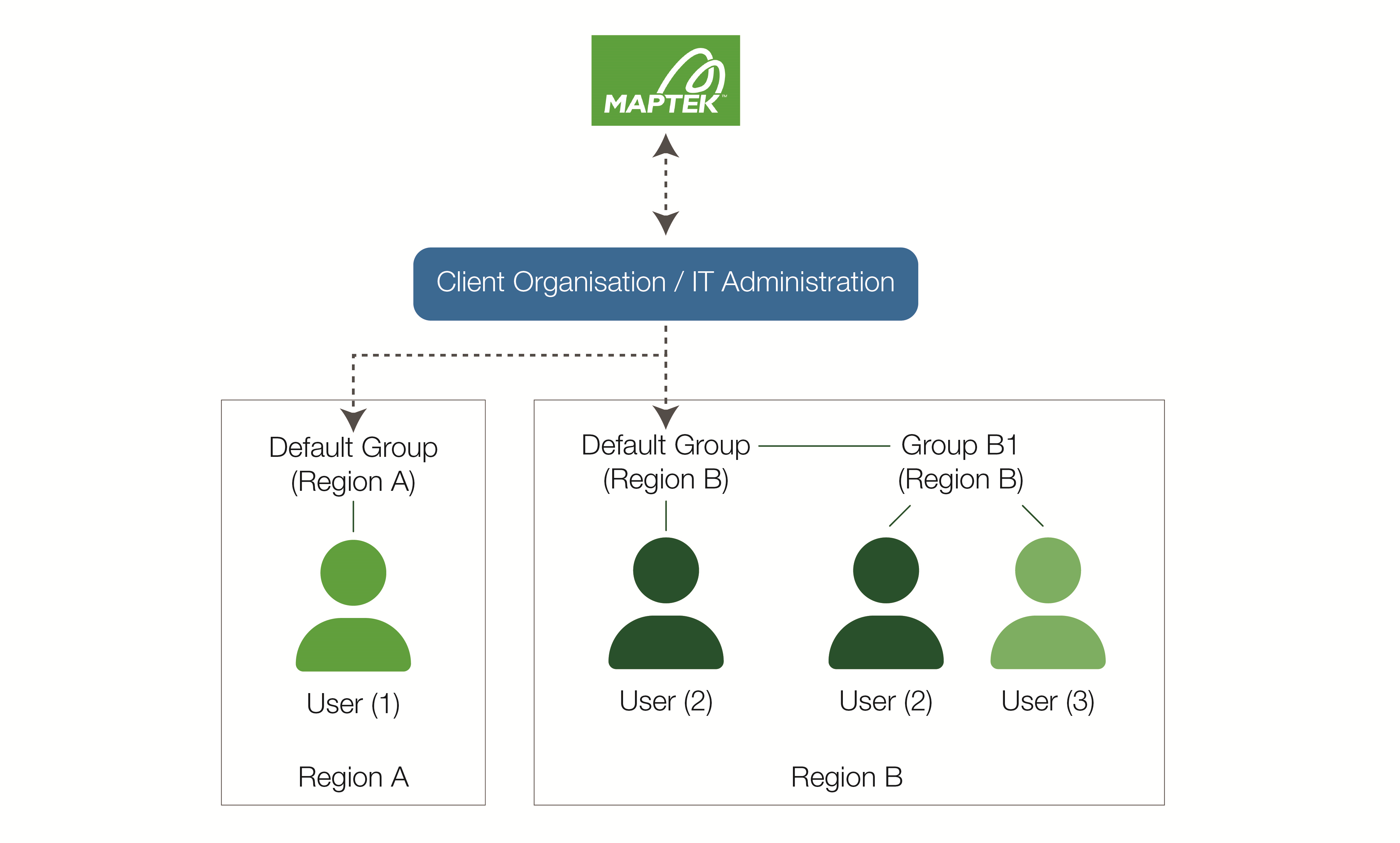
Regions, groups, and units help organise and manage the use of entitlements according to the needs of the organisation. Users must be assigned to the same region as any groups they are members of to be able to access the group entitlements. Users can be members of up to 20 groups. Initially, users are automatically added to the default group.
|
|
|
A simple Maptek Account configuration |
Regions
Regions are geographic areas of the globe covered by different Maptek business entities (i.e. Maptek regions). Each group must relate to a Maptek region; users in a group must also belong to the same Maptek region. Additionally, entitlements must have the same Maptek region as the group they are allocated to. The organisation IT administrator is responsible for setting up groups and their regions, as well as transferring users between groups in their region.
Note: To change the region of an entitlement, an IT administrator must contact Maptek.
Groups
Groups are sets of users and licence entitlements. Types of groups are described below.
Default groups
Maptek will provide a default group for each region relevant to the organisation. All newly provisioned entitlements will be added to default group(s) until moved by the organisation IT administrator. All newly registered users are initially made members of the default group for their region, but may be removed from the group by the organisation IT administrator.
Custom groups
Default groups may not provide sufficient flexibility in managing entitlements, especially for larger organisations. Administrators can create custom groups to match member users with specific licence requirements. For example, an organisation may have separate groups for mine planning and mine operations. They may also have groups for different mine sites.
Single user groups
Entitlements can be provisioned for use by a single user. Such entitlements can only be allocated to a single user group. If the user does not belong to an existing single-user group, they are automatically placed in a new single-user group, along with the single-user entitlement.
|
|
|
Single user group |

Demo groups
Demo groups are single-user groups that are only available for a limited time to allow a user to evaluate software products before committing to purchase. Maptek creates these groups automatically when providing a single-user demo entitlements; they cannot be modified by the client.
Once the demo period has passed, the demo group will also disappear.
|
|
|
Single user demo group |

Maptek managed groups
As the name suggests, Maptek managed groups cannot be modified by the client, thus preventing accidental modification. Clients must request changes from Maptek.
Units
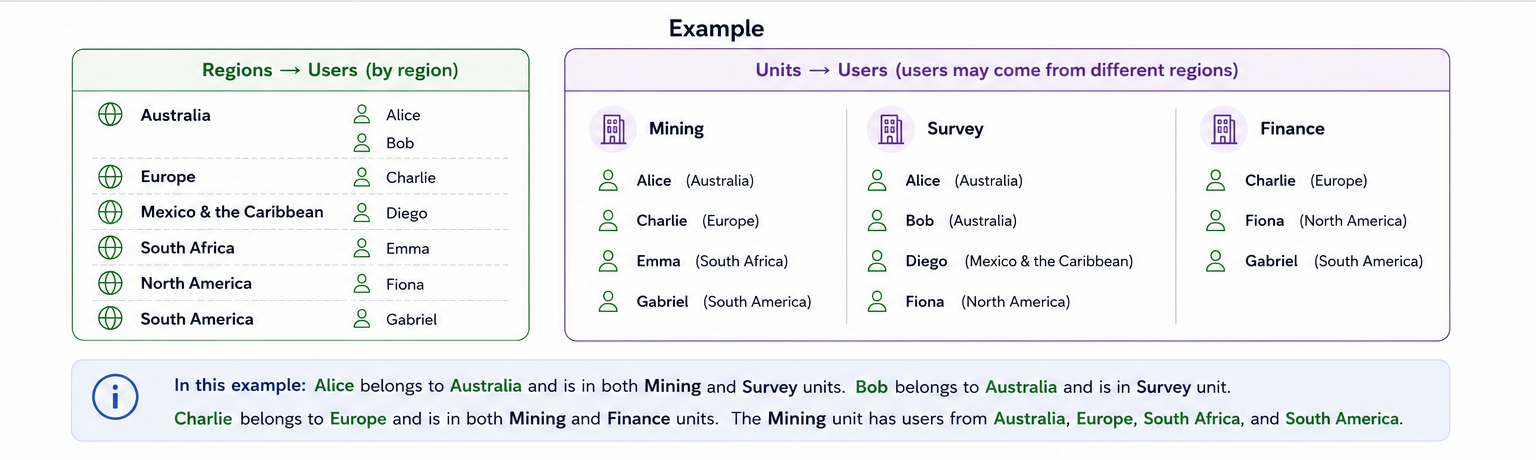
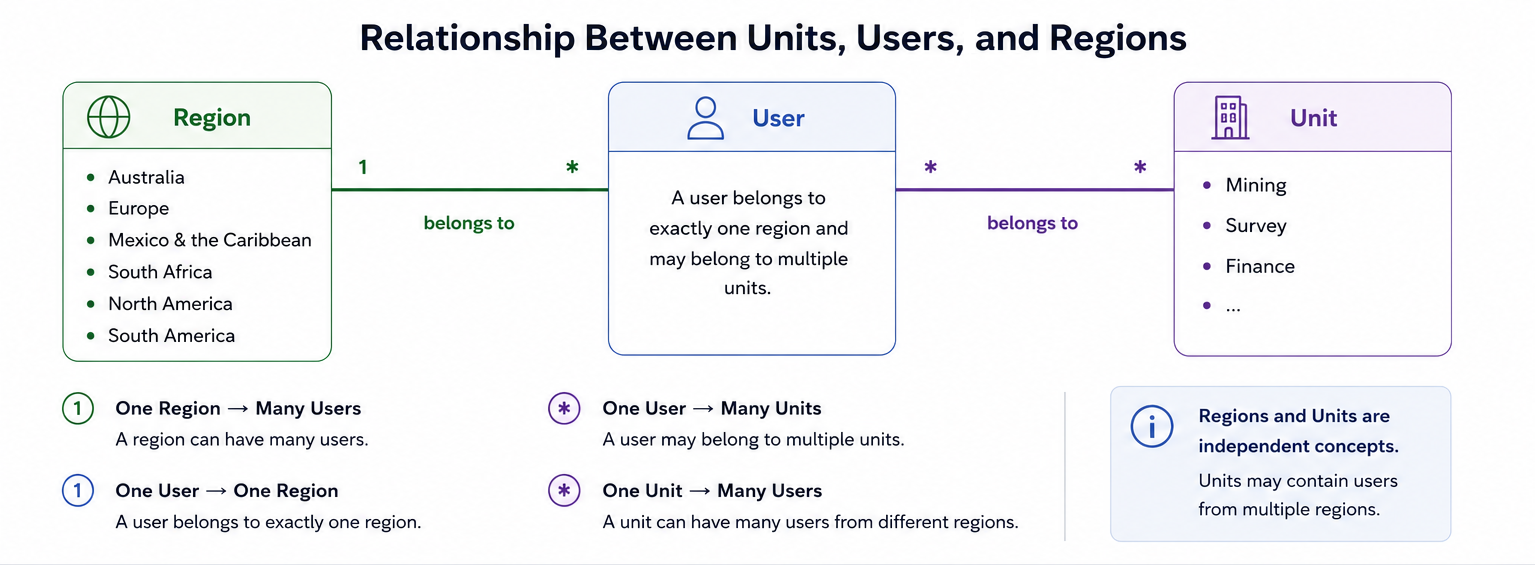
Units are scoped administrative containers or arbitrary collections of users, groups and entitlements that decentralised customer-defined unit administrators (Unit Admins) can manage, allowing delegated day-to-day administration without granting full organisation-wide admin access. A unit may span multiple regions and any region my have multiple units. Any user who has the appropriate permissions within the organisation can be assigned to any unit and may belong to multiple units simultaneously.
Units are different from groups:
-
A group is primarily used to manage membership and entitlement access.
-
A unit defines which users, groups and entitlements an administrator is allowed to manage. Creating a Unit or assigning something to a Unit does not automatically provide access to software.
Units may be useful for the following:
- Different mine sites
- Departments or teams
- Project teams
- Business sites, departments or sub-divisions
- Any case where tighter operational boundaries within the organisation are required.
Unit administration is not available by default. If your organisation would like to use unit administration, please raise a support case with Maptek.
Once activated, users with appropriate administrator permissions can create and manage units via Maptek Account. See Administrator Overview and More > Manage Unit Administration for details.
|
|
|
Relationships between units, users, and regions |
|
|
|
An example of the relationships between units, users, and regions |