Multi-Gaussian Simulation
Search Region
Instructions
On the Block menu, point to Simulation, and then click Multi- Gaussian Simulation.
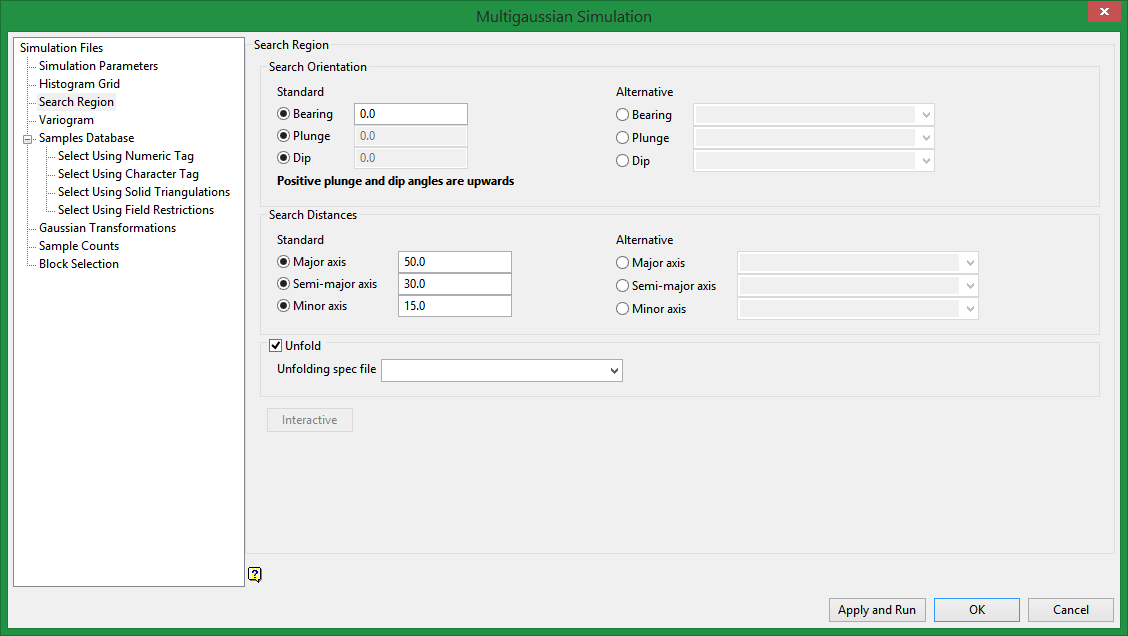
Search Region
Search Orientation
Standard
The Standard Bearing, Plunge and Dip values are angles, in degrees, that specify the orientation of the search ellipsoid and orientation of variogram structures.
Alternative
The Alternative Bearing, Plunge and Dip allows you to choose the values from variables found in the block model.
Bearing
Care must be taken with these parameters as there are several common misunderstandings about the meaning of these parameters.
To understand these parameters, imagine an ore body with a primary axis. To find the bearing of the ore body, project the ore body axis straight up onto the surface plane and call this line the bearing line. The bearing is the angle clockwise from north to the bearing line.
Plunge
Plunge is the angle between the horizontal plane and the ore body axis. Note that the plunge should be negative for a downward pointing ore body.
Dip
To find the dip of an ore body, imagine the ore body is located in a plane. First rotate around the Z axis by the bearing so that the ore body is pointing north. Then rotate around the east-west axis by the plunge so that the ore body is level with the ground. At this point the ore body is parallel to the north-south axis. The dip is the angle of rotation to bring the plane into the horizontal plane. Looking north, if the plane must be rotated clockwise around the north-south axis, then the dip is positive (other software packages may use the opposite convention).
Note: The terms bearing, plunge and dip have been used by various authors with various meanings. In this panel, as well as kriging and variography, they do not refer to true geological bearing, plunge and dip. The terms X', Y' and Z' axis are used to denote the rotated axes as opposed to X, Y and Z which denote the axes in their default orientation.
Search distances
Standard
The Standard Major, Semi-major, and Minor axis values are angles, in degrees, that specify the orientation of the search ellipsoid and orientation of variogram structures.
Alternative
The Alternative Major, Semi-major, and Minor axis allows you to choose the values from variables found in the block model.
Enter the dimensions of the search box. The search box has sides with length twice the numbers given.
-
The major axis radius is the search distance along the axis of the ore body.
-
The semi-major radius is the search distance in the ore body plane perpendicular to the ore body axis.
-
The minor axis radius is the search distance perpendicular to the ore body plane.
Note: Use the Display Ellipsoid option to verify that you are using the proper orientation angles. Display the search ellipsoids over your sample data to verify the correct orientation of the ellipsoid.
The search radii are true radii. If you set your major search radius to '100', then the ellipsoid has a total length of 200. The following diagram shows the relationship between the axes with the ellipse in the default orientation (bearing 90°, plunge and dip 0.00°).
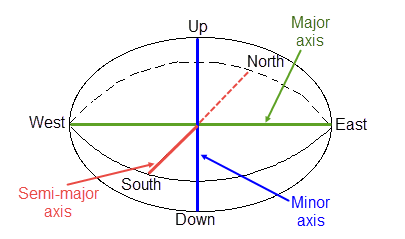
Figure 1 : Relationship between Radii
Unfold
Select this option if you are using a projection, bend, or LVA unfolding model. Select the (.tetra) spec file from the drop-down list.
Tip: Unfolding models can be applied to deformed strata bound deposits where mineralisation is controlled by a structural surface.
Interactive
Select this option to manipulate an on-screen ellipsoid to define the plane.
Related Topics

