

Projecting Points onto a Surface
The project_points_onto_surface() function allows you to project points onto a surface, similar to the Project to Surface tool in PointStudio and GeologyCore. However, using the SDK function provides additional flexibility, such as working with procedurally generated surfaces and manipulating points directly within the script.
Projecting points onto a procedurally generated surface
The following example script demonstrates projecting a random set of points onto a surface defined by facets hard-coded into the script:
from mapteksdk.project import Project
from mapteksdk.data import PointSet
from mapteksdk.operations import project_points_onto_surface, open_new_view
import numpy as np


RNG = np.random.default_rng()


surface_points = [
    [-2.5, -2.5, 1.5],
    [2.5, -2.5, 1.5],
    [2.5, 2.5, 1.5],
    [-2.5, 2.5, 1.5],
    [-1.5, -1.5, -0.5],
    [1.5, -1.5, -0.5],
    [1.5, 1.5, -0.5],
    [-1.5, 1.5, -0.5],
]
surface_facets = [
    [0, 4, 1],
    [4, 5, 1],
    [1, 2, 5],
    [2, 5, 6],
    [2, 6, 7],
    [2, 3, 7],
    [0, 3, 7],
    [0, 4, 7],
    [4, 5, 6],
    [4, 6, 7],
]


# 100 uniformly random points with each ordinate between -2.5 and 2.5.
points_to_project = (RNG.random(size=(100, 3)) - 0.5) * 5.0


with Project() as project:
    projected_points, facets = project_points_onto_surface(
        surface_points,
        surface_facets,
        points_to_project,
        discard_unprojected_points=True,
    )


    with project.new("cad/projected_points", PointSet) as point_set:
        point_set.points = projected_points
    open_new_view([point_set.id])
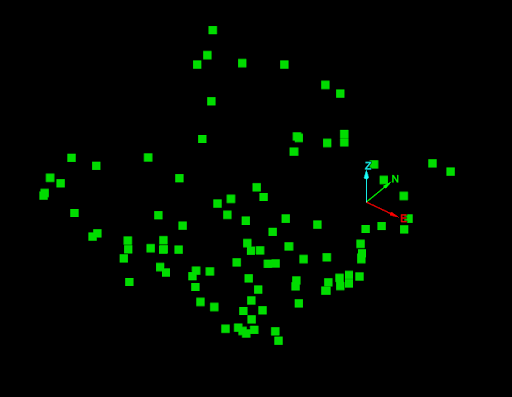
The screenshot below shows an example of the result of running this script.
To project points onto an existing surface, pass the points and facets arrays of the surface into the function. For example:
project_points_onto_surface(surface.points, surface.facets, points_to_project)
Determining which facets the points were projected onto
One advantage of projecting points using the SDK function is that in addition to returning the points projected onto the surface, it also returns the facet each point was projected onto. This allows you to perform operations on facets based on whether points were projected onto them.
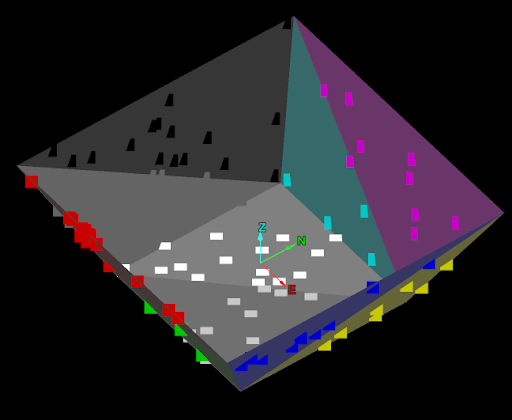
For example, the following script copies the facet colour of the facet each point was projected onto:
from mapteksdk.project import Project
from mapteksdk.data import Surface, PointSet
from mapteksdk.operations import project_points_onto_surface, open_new_view
import numpy as np


RNG = np.random.default_rng()


surface_points = [
    [-2.5, -2.5, 1.5],
    [2.5, -2.5, 1.5],
    [2.5, 2.5, 1.5],
    [-2.5, 2.5, 1.5],
    [-1.5, -1.5, -0.5],
    [1.5, -1.5, -0.5],
    [1.5, 1.5, -0.5],
    [-1.5, 1.5, -0.5],
]
surface_facets = [
    [0, 4, 1],
    [4, 5, 1],
    [1, 2, 5],
    [2, 5, 6],
    [3, 6, 7],
    [2, 3, 6],
    [0, 3, 7],
    [0, 4, 7],
    [4, 5, 6],
    [4, 6, 7],
]


# 100 uniformly random points with each ordinate between -2.5 and 2.5.
points_to_project = (RNG.random(size=(100, 3)) - 0.5) * 5.0


with Project() as project:
    # Discard unprojected points to avoid encountering an error later when indexing
    # into the facet colour array.
    projected_points, facet_indices = project_points_onto_surface(
        surface_points,
        surface_facets,
        points_to_project,
        discard_unprojected_points=True,
    )


    with project.new("cad/projected_surface", Surface) as surface:
        surface.points = surface_points
        surface.facets = surface_facets
        surface.facet_colours = [
            [200, 0, 0, 255],
            [0, 200, 0, 255],
            [0, 0, 200, 255],
            [200, 200, 0, 255],
            [0, 200, 200, 255],
            [200, 0, 200, 255],
            [0, 0, 0, 255],
            [100, 100, 100, 255],
            [200, 200, 200, 255],
            [255, 255, 255, 255],
        ]
        with project.new("cad/coloured_projected_points", PointSet) as point_set:
            point_set.points = projected_points
            # Set the colour of each point to be the colour of the facet it was
            # projected onto.
            point_set.point_colours = surface.facet_colours[facet_indices]
    open_new_view([surface.id, point_set.id])
The screenshot below shows an example of the result of running this script.
Discarding unprojected points
To ensure that unprojected points are handled properly by your script, you can set the discard_unprojected_points=True parameter when calling the project_points_onto_surface() function. This avoids potential errors when working with facet indices, especially when you later reference properties of the facets based on the projection.
projected_points, facets = project_points_onto_surface(
    surface_points,
    surface_facets,
    discard_unprojected_points=True
)
If discard_unprojected_points = False, the facet index corresponding to unprojected points will be an invalid index, which may lead to an exception being throw if the index is used to access a facet-based property.
