

Requesting Files and Directories
This page discusses methods of requesting a file or directory from the user in an SDK script.
Requesting a file
The request_file() operation causes the connected application to display a file open or save dialog. The selected file path is then returned to Python as a pathlib.Path object. The simplest usage of the function is to call it without any parameters:
from mapteksdk.operations import request_file
from mapteksdk.project import Project


if __name__ == "__main__":
    with Project() as project:
        file = request_file()
        # Do something useful with a file.
        # Hint: The requested file can be opened for reading as a text file
        # using:
        # with file.open("r", encoding="utf-8"):
        #     pass
The script above creates a file open dialog that prompts the user to choose any file. In general, this is not very helpful because very few operations will work on any file type.
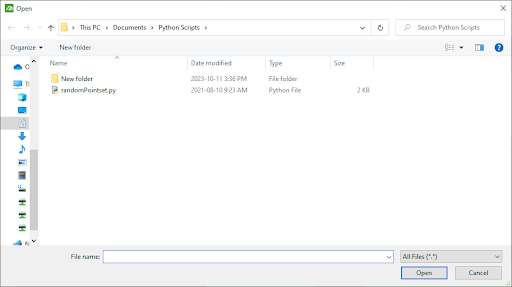
Typically, it is useful to specify the file types which the script accepts. For example, the following fragment creates a file dialog that only allows the user to select PNG and JPG files:
from mapteksdk.operations import request_file
from mapteksdk.project import Project


if __name__ == "__main__":
    with Project() as project:
        extensions = {"Image files" : ["png", "jpg"]}
        file = request_file(
            title="Select an image file to load",
            extensions=extensions,
            exclude_all_files_filter=True
        )
        print(file)
Note: The script above also specifies exclude_all_files_filter=True. This removes the “all files” filter which could be selected to choose files without the given extensions. The title parameter is also used to set the title of the window to help the user determine what the file dialog is for.
Creating a file
The previous examples demonstrated selecting a file that already exists. To prompt the user to create a new file, set the save parameter to True:
from mapteksdk.operations import request_file
from mapteksdk.project import Project


if __name__ == "__main__":
    with Project() as project:
        extensions = {"Image files" : ["png", "jpg"]}
        file_path = request_file(
            title="Select an image file to save",
            extensions=extensions,
            save=True,
            exclude_all_files_filter=True
        )
        print(file_path)
        # Note that file may or may not exist at this point.
        # It is safe to overwrite the file if it does exist, as
        # request_file() has already shown a confirmation dialog
        # about overwriting.
-
If the user cancels the file open dialog, it will raise an OperationCancelledError.
-
Calling request_file() with save=True will not create the file. The script must then create a file at the given path.
-
The open() method of the returned pathlib.Path() file can be used to open the file.
Requesting a directory
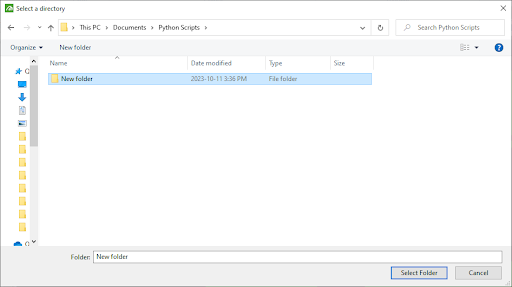
The request_directory() operation is similar to the request_file() operation, except it allows for the user to select a directory (or folder) instead of a file. The following script demonstrates using this function:
from mapteksdk.operations import request_directory
from mapteksdk.project import Project


if __name__ == "__main__":
    with Project() as project:
        directory_path = request_directory(
            title="Select a directory"
        )
        print(directory_path)
This script creates a standard directory selection dialog provided by the operating system, except it will be part of the connected application, meaning it will be minimised with the connected application.
-
The request_directory() operation only has a single argument, which is the title. This argument is optional and if not specified it will use the default provided by the operating system.
-
If the user cancels the file open dialog, it will raise an OperationCancelledError.
