

Working with Extents
The extent of a geometric object refers to the spatial range it occupies across each dimension in 3D space. It is an axis-aligned bounding box (AABB), which can be thought of as the smallest box that could fully contain the object. Each face of the box is aligned to the x-, y-, and z-axes, meaning the extent captures the minimum dimensions of the object along these axes. This extent does not necessarily correspond to the actual volume the object occupies but instead provides a convenient geometric boundary for quick spatial operations such as overlap detection.
An extent is represented in the SDK using the Extent class.
Extent operations
The following section covers the basics of working with extents.
Obtaining an object’s extent
The extent property of a geometric object (Topology.extent) stores its extent.
Querying the span
The Extent.span property stores a tuple storing the length of each component (x, y, z) of the extent.
Testing whether a point is contained within an extent
Python’s in keyword can be used to test whether a point (x, y, z) is contained within (or located on) the extent of an object, as shown in the code snippet below.
(0.5, 0.5, 0.5) in surface.extent
Testing whether an extent is contained within an extent
To check if one extent is completely contained within another (including edge-touching), you can also use the in keyword, as shown below.
smaller_surface.extent in surface.extent
Testing whether two extents overlap
To test if two extents overlap, which would indicate that the objects occupy a common area, use the Extent.overlaps() method. The following code snippet demonstrates using this method:
first_surface.extent.overlaps(second_surface.extent)
Testing extent overlap can be used as an initial step in checking whether two objects intersect. If the result of the expression above is False, the objects contained within each extent do not intersect. If True, a more computationally expensive check can be conducted to verify an intersection.
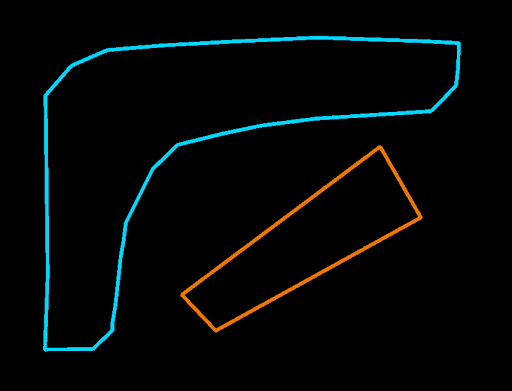
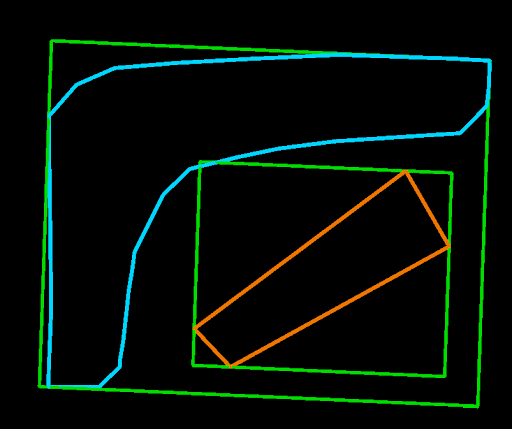
To help understand this, consider the two objects shown in the image below. The extents of these two objects overlap, but the objects themselves do not intersect.
The image below shows the same two objects but with two green boxes showing their extents.
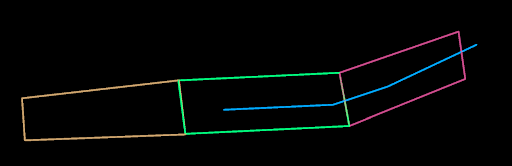
This approach is particularly useful when working with multiple shapes and you need to determine which objects require further analysis. For example, consider a scenario with three four-sided shapes and one line. You want to identify which objects the line intersects, and possibly where the points of intersection are. By first testing the extents of these objects, the script can quickly eliminate shapes that are not intersected by the line, streamlining the process and focusing on relevant objects.
Extent examples
The following examples demonstrate how extents can be used.
Drawing extents
This example demonstrates creating geometry that shows the extents of selected objects. It can be used to help visualise the extent of an object during development of your own scripts.
"""Creates geometry that demonstrates the extents of selected objects.

The resulting geometry is added to the current view or in a new view
if there is no view opened.
"""

from __future__ import annotations

import numpy

from mapteksdk.project import Project
from mapteksdk.data import Topology,  EdgeNetwork, ObjectID
from mapteksdk.operations import active_view_or_new_view

class Block:
    """Define a block (cube) in 3D space.

    It has 8 vertices/points, 6 faces and 12 edges.

    This assumes no rotation has been applied.
    """

    def __init__(self, centre: tuple, sizes: tuple):
        self.centre = centre
        self.sizes = sizes

    @property
    def points(self):
        """The 8 points that define the block.

        The first 4 points are one face of the cube.
        The last 4 points are the face opposite to that face on the cube.
        """

        centre = numpy.array(self.centre)
        offsets = numpy.array(self.sizes) / 2

        return numpy.array([
            centre + offsets * (-1, -1, 1),
            centre + offsets * (-1, 1, 1),
            centre + offsets * (1, 1, 1),
            centre + offsets * (1, -1, 1),

            centre + offsets * (-1, -1, -1),
            centre + offsets * (-1, 1, -1),
            centre + offsets * (1, 1, -1),
            centre + offsets * (1, -1, -1),
        ])

    @property
    def edges(self):
        """The 12 edges of the block.

    These are not the edges that form the facets (triangles) as there are
    six additional edges for that case.
    """
    return numpy.array([
        [0, 1], [1, 2], [2, 3], [0, 3], # Top face
        [4, 5], [5, 6], [6, 7], [4, 7], # Bottom face
        [0, 4], [1, 5], [2, 6], [3, 7], # Sides
    ])

def create_extent_box(topology: Topology,
                      project: Project) -> ObjectID[EdgeNetwork]:
    """Create a wireframe of the extent of the given object."""
    block = Block(topology.extent.centre, topology.extent.span)

    with project.new(f'/cad/extents/{topology.id.name}',
                     EdgeNetwork) as box:
    box.points = block.points
    box.edges = block.edges

    return box.id

def create_extent_boxes(objects: list[ObjectID[Topology]],
                        project: Project) -> list[ObjectID[EdgeNetwork]]:
    """Create a wireframe of the extent of the given objects.

    Return an edge network for each topology that represents its extent.
    """
    extent_boxes = []
    for obj in objects:
        with project.read(obj) as topology:
            extent_boxes.append(create_extent_box(topology, project))
    return extent_boxes

if __name__ == '__main__':
    with Project() as project:
        selected_objects = project.get_selected()

    # Draw the extents of the selected objects.
    extent_boxes = create_extent_boxes(selected_objects, project)
    view = active_view_or_new_view()
    view.add_objects(extent_boxes)
Colour points within two objects
This example first checks whether the extents of two objects overlap, then colours each point in the objects based on whether the point is inside or outside the extent of the other object.
It demonstrates both the Extent.overlaps() method and the in keyword, highlighting an efficient approach: check if the extents of objects overlap before testing each point. This reduces unnecessary comparisons when the objects do not overlap.
For this script to run, at least two selected objects with overlapping extents are required.
def colour_points_with_extent(extent, topology: PointSet):
    """Colour the points in topology that are inside the given extent."""

    points_contained = numpy.fromiter(
            (point in extent for point in topology.points),
            dtype=numpy.bool,
			count=topology.point_count,
	    )

    # Colour all the points within the extent green with some translucency.
    topology.point_colours[points_contained] = (0, 254, 0, 25)

if __name__ == '__main__':
    with Project() as project:
        selected_objects = project.get_selected()
        object_names = [selected.name for selected in selected_objects]

        # Collect the extents of the selected objects.
        object_extents = extents(selected_objects, project)

        # Firstly, we use overlap() for a quick initial test.
        # Secondly, we use use the in operator against each point and
        # the extent. Lastly, we colour the points based on the previous
        # check.
        for lhs, rhs in itertools.combinations(object_extents, 2):
            if lhs.overlaps(rhs):
                hs_object = selected_objects[object_extents.index(lhs)]
                rhs_object = selected_objects[object_extents.index(rhs)]

                with project.edit(lhs_object) as topology:
                    colour_points_with_extent(rhs, topology)

                with project.edit(rhs_object) as topology:
                    colour_points_with_extent(lhs, topology)
