

View
Source file: view.htm

View tools
The following table describes the tools available in the View group of the Home tab.
 New View New View |
Open a new view window. |
 View Selection View Selection |
Display selected data in a new view window. |
 Saved Views Saved Views |
Save and retrieve the state of the current view window, such as the zoom level, lighting and contents. The views that you saved will be displayed on top of the Saved Views drop-down list, above the
|
 Save View tool.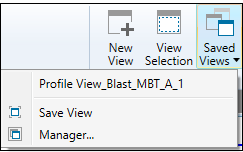
Managing views
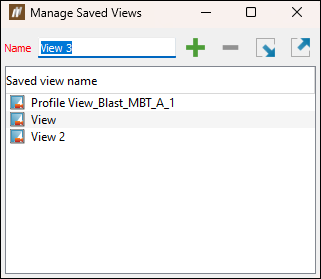
The  Manager... tool allows you to add new views, rename, and delete them from your local database. The Manage Saved Views panel will appear when you select Manager... from the Saved Views drop-down in the Home tab.
-
To save the current state of view window, specify the name of the view to be saved and click
 (Save the active view).
 -
To delete a previously saved view, select it on the Saved view name list and click
 (Delete selected saved views).
Tip: To delete multiple views at once, select them while pressing Ctrl and click
(Delete selected saved views). -
To rename a view, double-click on it and enter the new name.
-
To load a previously saved view, click
 (Import saved views from file) and select the required View file (.vwr) from the location on your machine.
 -
To export a saved view, select it on the list and click
 (Export saved views to file). BlastLogic will save it as a View file (.vwr) under the location that you specify.
