

Objectives in Origin Blocks
Source file: origin-blocks-setups-objectives.htm
Objectives guide the Evolution engine to derive the best outcomes in schedules for your setups.
Setup objectives
When you first create an Origin Blocks setup, you must select one of the following primary objectives:
-
 Material Movement: Use diggers to model the movement of material from all pit and stockpile sources to all mill and stockpile destinations. See Material Movement for more information.
Note: When generating schedules for Material Movement setups, Evolution does not take into account the time taken to transport material from the pit to other locations (for example, stockpile, mill, or waste utility).
Or
-
 Equipment: Use diggers, trucks, and road networks to model the movement of material from all pit and stockpile sources to all mill, stockpile, and waste utility destinations. This includes modelling truck movement and available hours. Setups can be limited by truck hours when required. See Equipment for more information.
You can also set the following optional objectives:
-
 Min-Max: Target a required grade profile or an accumulation of a model item per period. See Min/Max Objectives for more information.
-
 Blend: Prioritise mining sequences to achieve blend targets and improve grade outcomes. Redirect material from stockpiles to processes, and between processes when needed. See Blend for more details.
-
 NPV: Perform value calculations during a schedule optimisation to generate higher values based on costs and revenue. See Net Present Value for more information.
See also: Create an Origin Blocks Setup
These are soft objectives, which means that Evolution can violate them if it cannot find a solution that satisfies all of them at once.
Example:
If a target for digger hours cannot be met without missing the mill feed target, one of these requirements may be exceeded.
Note: In practice, if a population size is high enough (that is, proportional to the number of schedules the engine explores), violations usually only occur when no valid alternative exists. Therefore, while objectives guide the Evolution engine, they are not strict limits like the selected period target. For more information on population size settings, see Settings for Origin and Population Size.
This approach allows Evolution to agilely explore trade-offs and find practical, high-quality schedules, even when the setup constraints are tight.
Combining targets and objectives for the best schedule outcomes
When configuring your Origin Solids setup, you must select one of the following End of Period Target types in the  Targets subtab of the Calendar tab:
-
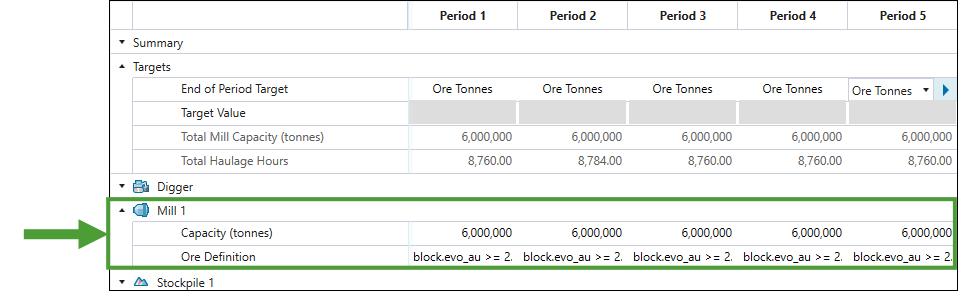
Ore Tonnes. The returned schedule will ensure that all mills in your setup meet their capacities in a given period.
Note: When you set Ore Tonnes as your end of period target, you must also specify the capacity and ore definition for each mill in the Mill section.
-
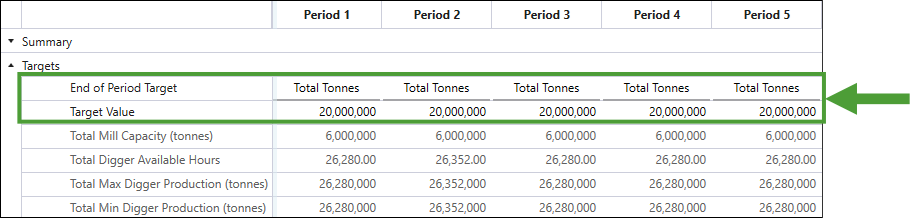
Total Tonnes. The returned schedule will end the period when the total tonnes of ore and waste excavated from the pit and reclaimed from stockpiles in a given period meet the value that you set in the Target Value field.
-
Digger Hours. The returned schedule will end the period once all available digger hours are used in a given period. See Objectives in Origin Blocks for information on calculating available digger hours in a period.
Note: This target can be set only in the Material Movement schedules.
-
Haulage Hours. The returned schedule will end the period once all available truck haulage hours are used in a given period. See Calendar > Equipment for information on calculating available haulage hours in a period.
Note: This target can be set only in the Equipment schedules.
-
Volume. The returned schedule will end the period once the total volume of material excavated from the pit and reclaimed from stockpiles in a given period meets the value that you set in the Target Value field.
See also: Targets
The target that you set becomes a hard constraint that defines when the period ends. Evolution will combine the two other targets that you have not selected into a single default objective based on which it will proceed with optimisation. In addition to these two remaining targets, Evolution includes the following factors when calculating the value for the default objective:
-
The number of actual truck hours used against the expected truck hours usage.
-
The number of actual digger hours used against the expected digger hours usage.
-
The actual mill feed against the target mill feed.
-
The amount of wasted ore (that is, ore sent to waste instead of processing node).
-
The amount of rehandled ore (that is, ore sent to overflow stockpiles instead of being processed directly).
Each of the above factors contributes to a total violation score that the engine minimises during optimisation. The value achieved for this default objective for the derived schedules allows you to compare them to one another and find the most optimal one. The closer a schedule meets these soft objectives, the lower the score.
The additional objectives that you set when you create a setup (maximizing the NPV or meeting a blend target) are treated independently from the default objective and are used alongside it when optimising multiple objectives.
