Blend
Origin Solids supports producing schedules that maintain specified model variables between upper and lower limits for individual process feeds. If it is not possible to maintain these limits, the produced schedules will be minimising their violation. You can also use other constraints to further reduce these violations. For more information on the constraints in this Evolution module, see Constraints in Origin Solids.
Origin Solids will try to achieve blend targets through prioritising mining sequences that produce better blend outcomes by redirecting material that was bound for a stockpile directly to a process and, optionally, by redirecting material between processes. In addition, if there are multiple stockpiles to reclaim from, Origin Solids will choose the best stockpile for meeting your blend target.
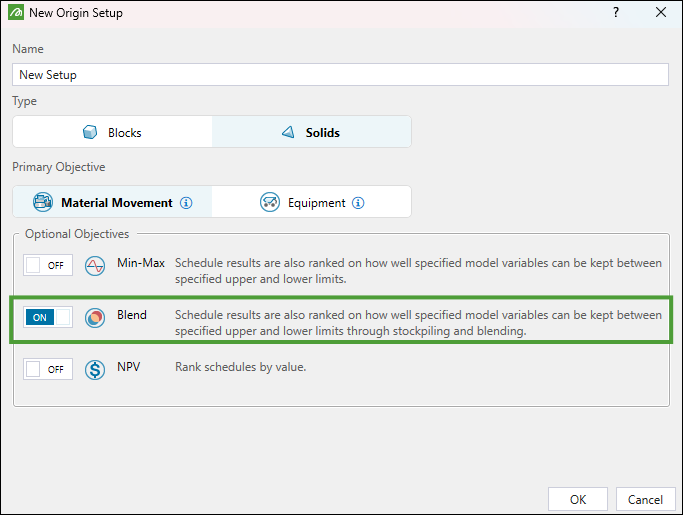
To include blends in your setup, you must select  Blend in the New Origin Setup panel window when you create a new setup.
For more information on creating setups, see Create a Setup.
Blending principles and reclaim types
Evolution uses two main automatic approaches to meet blend targets in Origin Solids:
-
The default optimisation approach to automatic reclaims, which is a rule-based optimisation process (heuristic). It enables material redirection and reclaims (subject to setup constraints) for the purpose of meeting blend targets.
Note: Material redirection refers to material redirected before the end of a schedule period from processes to stockpiles, processes to waste dumps, or stockpiles to processes.
The default optimisation approach is triggered when the following conditions are met:
-
Blend is selected as a secondary objective.
-
The end-of-period target in the setup is not Equipment Time.
-
-
The advanced blending optimisation approach, which uses a linear programming model and runs only when the following conditions are met:
-
Blend is selected as a secondary objective.
-
The end-of-period target is tonnage-based (not Equipment Time).
-
The advanced blending is enabled.
See also: Advanced blending in Blend Calendar
This configuration enforces blend targets as a hard constraint. If there is no feasible solution to meet the blend target in a given period or validation fails, Evolution will fall back to the default rule-based approach.
-
Note: Both approaches for redirecting and reclaiming material to meet the blend constraint will target the average blend target range value. End-of-period top-ups will aim to not exceed the upper and lower bounds. If you enable the Process Accumulation or Global Accumulation constraint in your setup, the constraint thresholds will be enforced as hard constraints for both approaches. When a threshold is binding, no redirect or reclaim will occur, even if a plant shows shortfall. For more information on constraints, see Constraints in Origin Solids.
Note: Blending optimisation is unavailable when Equipment Time is selected as the end-of-period target, as it disables the in‑period redirect and reclaim. End-of-period top-ups are constrained by available time and equipment capacity.
The following reclaim types are used in Origin Solids:
-
Manual reclaims: Manual reclaims are prioritised over automatic reclaims, provided schedule constraints allow for material movement and delivery. Evolution will still attempt to proceed with automatic end-of-period top-ups, but these are limited by available period hours and, if enabled, by fixed digger and truck capacity thresholds.
Note: The Use excess digger hours for stockpile reclaim option, which you can set in the
 Mining tab in setups without the Blend objective, applies exclusively to manual reclaims. See Mining > Reclaims for details.
See also: Digger in Origin Solids Targets, Productivity in Equipment setups, Digger Productivity in Material Movement setups
-
Automatic reclaims: Automatic reclaims are rule-based or optimisation-driven processes designed to meet end-of-period targets and achieve blend objectives when blending is enabled, subject to setup constraints. If you select the Prioritize Stockpile Depletion option in the stockpile configuration, Evolution will reclaim available material ahead of mining within applicable constraints.
See also: Stockpile configuration in Origin Solids
-
Automatic post-mining reclaims: The final reclaims that are performed after completing the solid sequence within a scheduled period. Their purpose is to meet tonnage, accumulation, and blend targets. Execution is subject to destination capacity constraints and equipment or time limitations.
Note: Enabling the net present value (NPV) as secondary objective will never initiate reclaim or redirect on its own.
The table below outlines automatic redirecting and reclaiming processes specific to Evolution Origin Solids.
| End of Period Target | Blend | Process Feed | Behaviour | Engine Mechanism | Potential Reclaim Type(s) |
|---|---|---|---|---|---|
| Accumulation | Disabled | Process capacity reached with ex-pit material. | No automatic reclaims | — | Manual reclaims |
| Accumulation | Disabled | Process shortfall | Meet the end-of-period mass or accumulation target (subject to accumulation constraints). | Default optimisation approach (rule-based) | All reclaim types |
| Accumulation | Enabled | Process capacity reached with ex-pit material. | Enforce blend bounds; no change if already within bounds or if constraints apply. | Advanced blend optimisation when feasible, otherwise the default optimisation approach (rule-based) | All reclaim types |
| Accumulation | Enabled | Process shortfall | Meet the tonnage, accumulation, and blend targets (subject to accumulation constraints). | Advanced blend optimisation when feasible, otherwise the default optimisation approach (rule-based) | All reclaim types |
| Process Accumulation | Disabled | Process capacity reached with ex-pit material. | No automatic reclaims | — | Manual reclaims |
| Process Accumulation | Disabled | Process shortfall | Meet the end-of-period mass or accumulation target (subject to accumulation constraints). | Default optimisation approach (rule-based) | All reclaim types |
| Process Accumulation | Enabled | Process capacity reached with ex-pit material | Enforce blend bounds; no change if already within bounds or if constraints apply. | Advanced blend optimisation when feasible, otherwise the default optimisation approach (rule-based) | All reclaim types |
| Process Accumulation | Enabled | Process shortfall | Meet the tonnage, accumulation, and blend targets (subject to accumulation constraints). | Advanced blend optimisation when feasible, otherwise the default optimisation approach (rule-based) | All reclaim types |
| Equipment Time | Disabled /Enabled | Process capacity reached with ex-pit material. | No in‑period redirect or reclaim; no automatic top‑ups if end-of-period target is met. | — | Manual reclaims |
| Equipment Time | Disabled /Enabled | Process shortfall | Attempt to meet time‑consistent mass at the end of period (bounded by period hours and hard limits); no in‑period redirect or reclaim. | Default optimisation approach (rule-based) | Manual reclaims and automatic post-mining reclaims |
Operation sequence
Evolution makes changes in extraction sequence to try to meet blend targets in all setups where such targets have been set. These changes are made regardless of the End of Period (EOP) target that you have set in the  Calendar > Targets subtab.
However, if you have set Accumulation or Process Accumulation as your EOP target, Origin Solids will use the below sequence of steps to attempt to keep processes at capacity and within the blend target, as follows:
-
Attempt to meet process capacity and blend targets through the choice of mining sequence.
The mining sequence mines whole solids, but considers the destination of individual parcels within each solid (some parcels will go to waste, other parcels to stockpiles, and other parcels to processes). If this solution satisfies the mill capacities, then Origin Solids takes no further action, even if blend targets are not met. If process capacities are not met, then Origin Solids will proceed with Step 2. -
Redirect parcels bound for stockpiles to processes linked in the flowchart to better meet process capacities.
Origin Solids can redirect up to half of all parcels in a period. If this redirection still does not satisfy the capacities, then Origin Solids will proceed with Step 3. -
Reclaim ore from stockpiles to meet capacities.
If at this point capacities are still not achieved, Origin Solids takes no further action, even if blend targets are not met. If capacities are met, but not the target blend, the Origin Solids will proceed with Step 4. -
Swap parcels that were redirected in Step 2 for parcels that were not redirected.
Origin Solids performs this swapping to see if it can achieve a better blend outcome. The swapped parcels may have lower tonnage than those originally chosen in Step 2. If this is so, and the blend is still not achieved, Origin will proceed with Step 5. -
Reclaim material from stockpiles to meet the target.
Note: With the above logic, it is easier for Origin to blend if it has access to smaller sized solids and parcels. If it is difficult to achieve a blend, consider choosing a smaller solid size for your project.
Blend configuration
The Blend tab allows you to add and configure blend objectives.
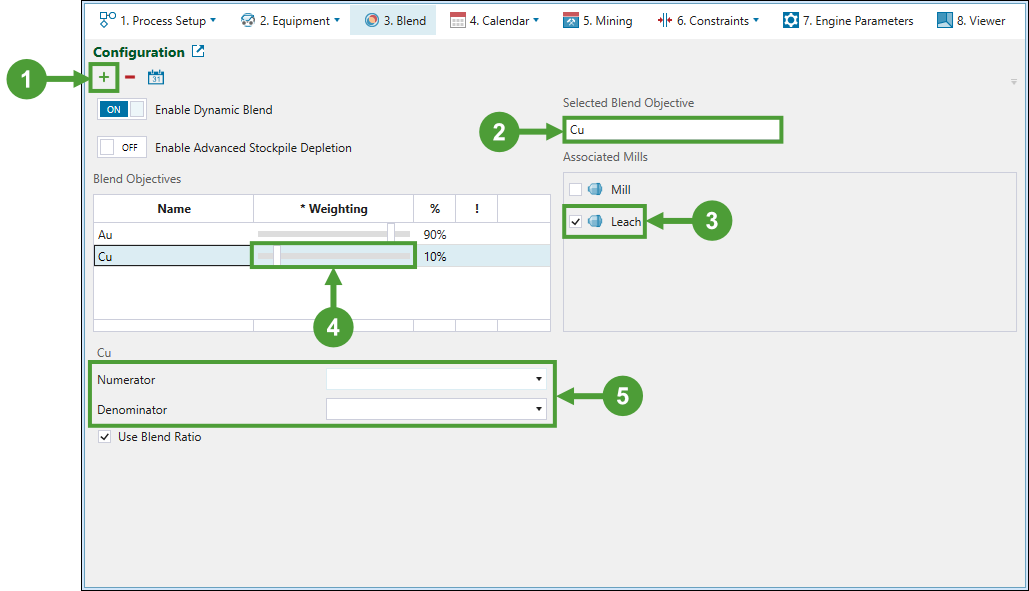
Follow these steps to add a blend objective:
-
Click
 to add a new objective to the Blend Objectives table.
 -
Enter the name of your new objective under the Selected Blend Objective.
-
Select the mill to associate your objective with.
-
Specify the importance of your new blend objective in the schedule by setting the percentage using the slider in the * Weighting column.
Note: The sum of all blend objective weightings must equal 100%.
-
Select the blend for the given grade item by selecting it from the Numerator drop-down. To set a blend target that is a ratio of two different grades, select the Use Blend Ratio checkbox and select a different grade item from the Numerator and Denominator drop-downs.
-
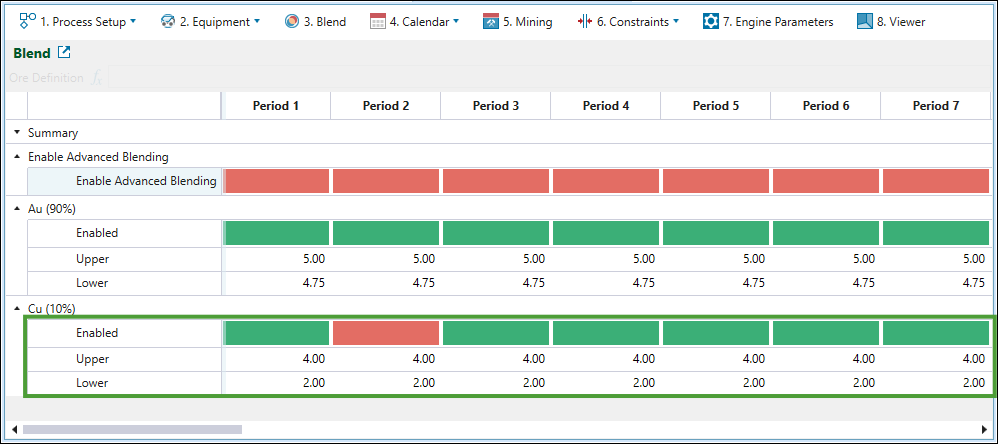
Go to the
Calendar tab > Blend subtab and set the range for mill processing by determining the upper and lower limits. You can also enable the blend target application in each period in the Enabled row.Note: The green fields indicate that the blend target is being applied in the corresponding period, whilst the red fields indicate that the blend target has been disabled for that period.
Dynamic blend
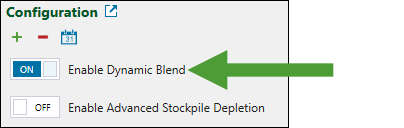
The Dynamic Blend option allows processes to have mutually inclusive ore definitions set in the Calendar. When it is enabled, Origin Solids can determine which process the mined ore should be sent to. This allows for more flexibility in choosing the target process, which results in achieving better blends.
To set dynamic blending in your setup, click the Enable Dynamic Blend toggle button to enable it.
Note: If Blending and Dynamic Blending are not enabled, the stockpile ore definition must be mutually exclusive from the ore definition provided for the mill. This ensures that no solid can satisfy the definition for more than one destination because the Origin Solids module uses these definitions to determine where the ore tonnes from each solid should be sent.
Important: Blending functionality might be restricted by the characteristics of your setup. For example, if you have applied Process Accumulation as the end of period target, redirecting material from the mill would cause the mill to work under its capacity.
Advanced stockpile depletion
To activate advanced stockpile depletion in your setup, toggle the Enable Advanced Stockpile Depletion option in the Blend Configuration tab. This setting improves how Evolution manages stockpile reclaiming after pit material has been exhausted, enabling it to optimise stockpile depletion to better meet blend targets, instead of simply reclaiming in the preferred stockpile order.
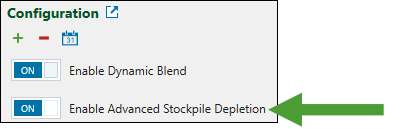
When you enable this setting, Evolution will proceed with the following:
-
Analyse the available pit parcels and stockpile states, each with distinct grade and mass attributes, to calculate the optimal material distribution that will satisfy the mills' blend objective.
-
Calculate the minimum material required to be redirected and reclaimed to achieve the blend target.
-
Perform a secondary optimisation to prioritise mill material, while ensuring the blend is achieved.
Note: If the blend target cannot be achieved with the available material, Evolution will revert to standard blending behaviour and aim to get as close as possible to the target.
Important: Since the blend range is the primary optimisation goal, Evolution may sometimes recommend underfilling the mill if that is the only way to achieve the blend. In these cases, you can disable advanced blending on a per-period basis. For more information, see Advanced blending in Blend Calendar below for more information.
Advanced blending in Blend Calendar
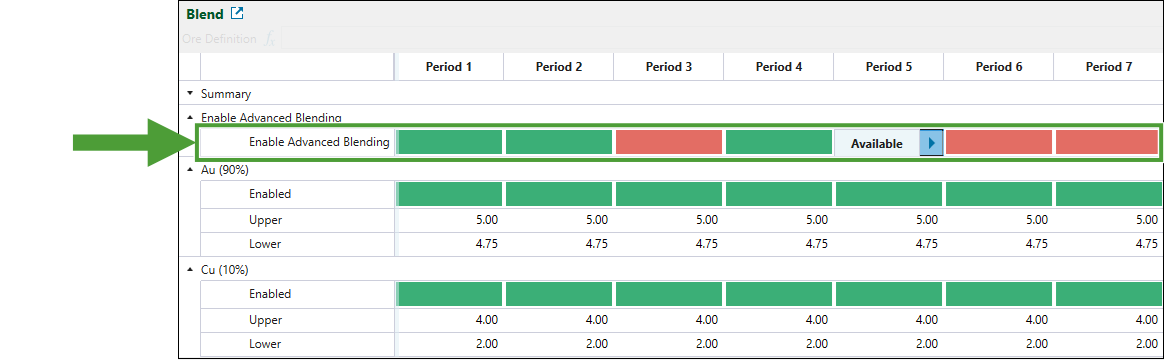
The advanced blending functionality is enabled when blending is set as a secondary goal, the end-of-period target is measured in tonnage, and the advanced blending option is enabled. To adjust this setting for each period, go to the Calendar tab > Blend subtab and apply the settings as required.
A green field indicates that advanced blending is available for that period, while a red field means it is not. To change this setting, double-click on the cell and select either Available or Unavailable.
-
Click the
 button once to copy the properties of the current period to the next period.
 -
Double-click the
button to copy the properties of the current period to the subsequent periods until the end of the schedule. -
Alternatively, copy a cell's setting using Ctrl+C , then paste it into selected cells with Ctrl+V.