

Calendar
Source file: strategy-setups-economic-model-calendar.htm
The  Calendar subtab allows you to specify the costs and processing capacity in each period of your setup.
Calendar
To enter the Calendar subtab, go to the Targets & Economics tab and select it from the drop-down list. 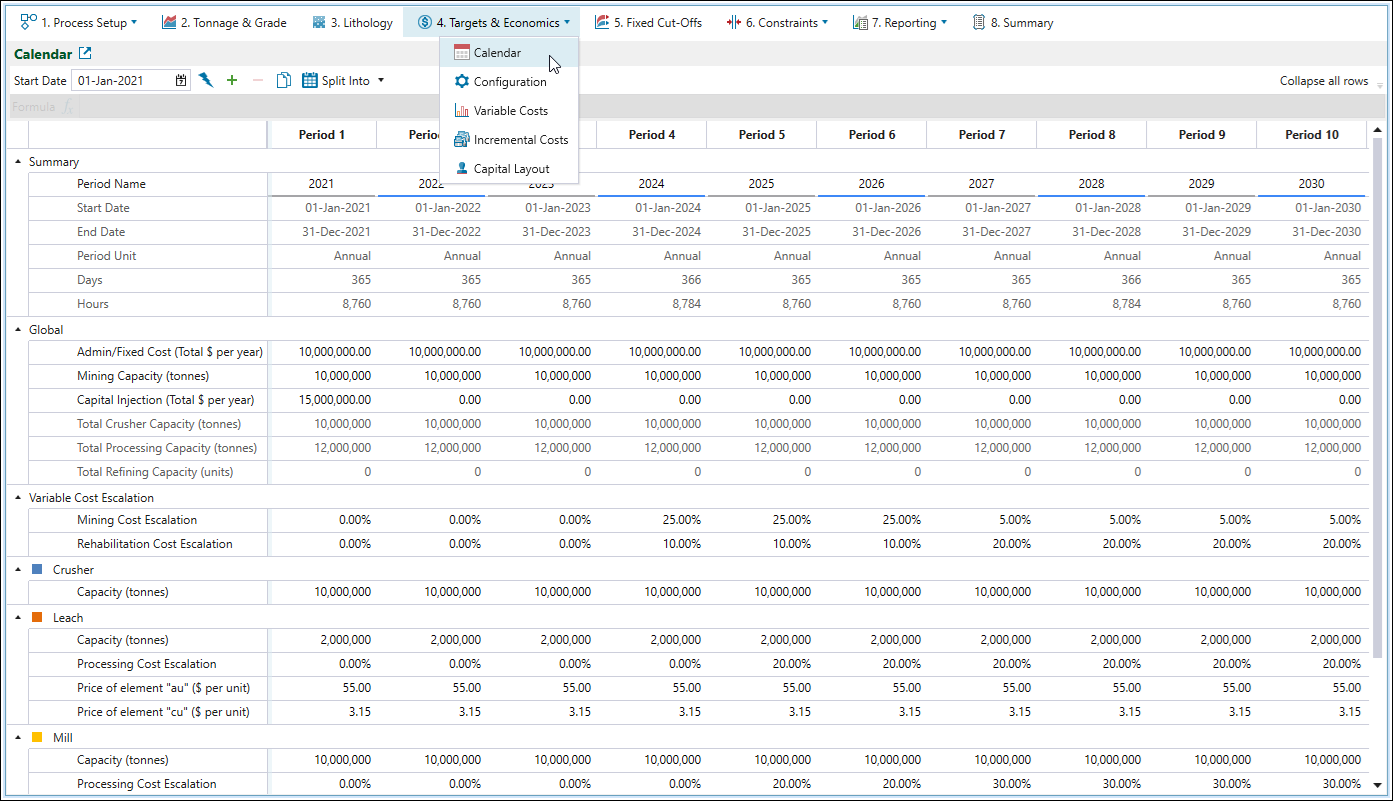
Note: If a schedule takes longer than the number of periods in the calendar, the values in the final calendar period will be used for all subsequent schedule periods.
The Calendar subtab features the following controls: 

|
Start Date
Sets the desired start date of the schedule. Start dates of other consecutive periods are determined based on this date. |

|
Generate Periods
|

|
Add an extra period to the calendar
Note: This button will be dimmed if no periods have been added to your setup. Use the |

|
Delete currently selected period
Note: You can select multiple periods by pressing and holding Shift and selecting the periods you wish to delete. |

|
Copy calendar to clipboard
Allows you to copy calendar data to the clipboard so that it can be later pasted into another document. |

|
Split into
Note: In Strategy, a period must always be of equal or greater length than the periods preceding it. Therefore, while you can configure period lengths to increase over time, you cannot set a period to be shorter than any of its preceding periods. |
Parameters
The parameters that you can set in the  Targets & Economics > Calendar subtab are divided into the following groups:
- Summary
- Global
- Variable Cost Escalation
- Crusher
- Process
- Beneficiation Group
- Crusher
- Grinding, Flotation, Bulk Ore Sorting, Coarse Particle Recovery
- B.O.S. Rejects, C.P.R. Rejects, Flotation Rejects
- B.O.S. Stockpile Reclaim, C.P.R. Stockpile Reclaim, Flotation Stockpile Reclaim
- B.O.S. Waste Capacity, C.P.R. Waste Capacity, Flotation Waste Capacity
- Reclaim Processing
- Pits
- Stockpiles
- Stockpiles
Summary
The Summary group provides information on the start and end dates of a period, as well as the length of each period. These intervals are calculated automatically when you create periods during calendar setup.
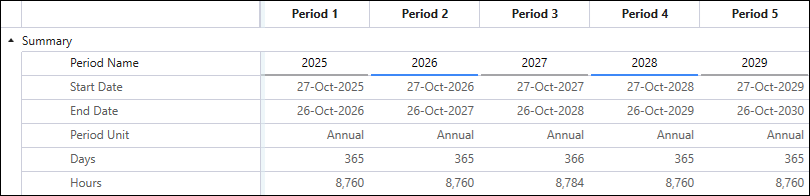
You can assign custom period names to easily identify these periods in other setup areas and reports. To do so, double-click on the cell that corresponds to the particular period in the Period Name row and enter the required name.
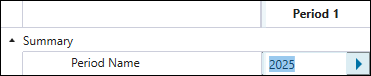
Click
 to copy the value from the current cell to the next period. Double-click to copy the value to all subsequent periods.
Global
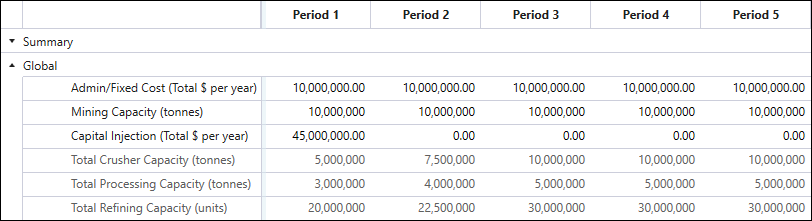
You can set the following parameters under the Global group:
-
Admin/Fixed Cost ($ per year): Costs that occur regardless of mine production. Administration and fixed costs should include not only various business costs, but also the mining expenses that are incurred regardless of production rate, that is, maintenance, employment costs, or loan repayments. Fixed costs are used in net present value (NPV) calculations, and hence influence the resultant schedule. Enter the costs that occur during mine operation.
-
Mining Capacity (tonnes per year): The maximum tonnage (waste and ore) that can be mined in all pits. To specify this mining target, use the Global Accumulation constraint. Although the upper limit that you set is a hard constraint (the limit must be obeyed by Evolution when it generates a schedule), Strategy can return schedules below this limit if they produce higher NPVs. See Global Accumulation for more information.
-
Capital Injection ($ per year): This parameter refers to the expenses that are incurred at fixed dates. Such costs are applied at the specified period, and are unrelated to the mine's status or operation. Enter any up-front or ongoing capital requirements.
Note: The capital spent on mine, mill, or fleet expansions should be configured in
Targets & Economics >  Capital Layout subtab, since such expenses occur at a known event, but unknown date. See Capital Layout for more information.
Note: To configure the capital required due to dump expansions, go to the
 Process Setup >
  Configuration subtab and specify the Incremental Capacity (t) and Incremental Cost ($) for each dump. See Configuration for more information.
Note: The Capital Injection row can be replaced with multiple itemised capital expenditures through
Targets & Economics > Configuration page. See Configuration for more information.
The Global section also contains the following non-editable parameters:
-
Total Crusher Capacity: Represents the summed total of all crusher capacities in the setup.
-
Total Processing Capacity: Represents the summed total of all process feed capacities in the setup.
-
Total Refining Capacity: Represents the summed total of all process refining capacities in the setup. This is the maximum amount of product that can be produced.
Variable Cost Escalation

Typically, mining and rehabilitation costs tend to vary based on the mining location in the pit, thus they are known as variable costs. However, these costs may increase over time due to inflation or other external factors. To model cost inflation, enter a percentage increase in variable costs for each period under the Variable Cost Escalation category in the calendar.
The increased costs that you can enter are as follows:
-
Mining Cost Escalation
A percentage-based cost increase in mining costs that you can define separately for each period. This cost applies to every tonne of material mined during the specified period. -
Rehabilitation Cost Escalation
A percentage-based cost increase related to the rehabilitation of waste material in each period. This cost applies to every tonne of material mined during the specified period.
Note: The above, percentage-based costs, will be included in the calendar when you set the mining and rehabilitation costs in the  Variable Costs subtab (see Variable Costs for more information).
If you do not set these attributes in the Variable Costs subtab, the Calendar subtab will include the Costs group (instead of the Variable Cost Escalation group) for you to set the unit mining and rehabilitation costs incurred per tonne in each period. 
Similarly, if you set only one of the attributes in the Variable Costs subtab, Evolution will generate two setting groups in the Calendar (Variable Cost Escalation group for the configured attribute and Costs group for the unconfigured attribute), as follows: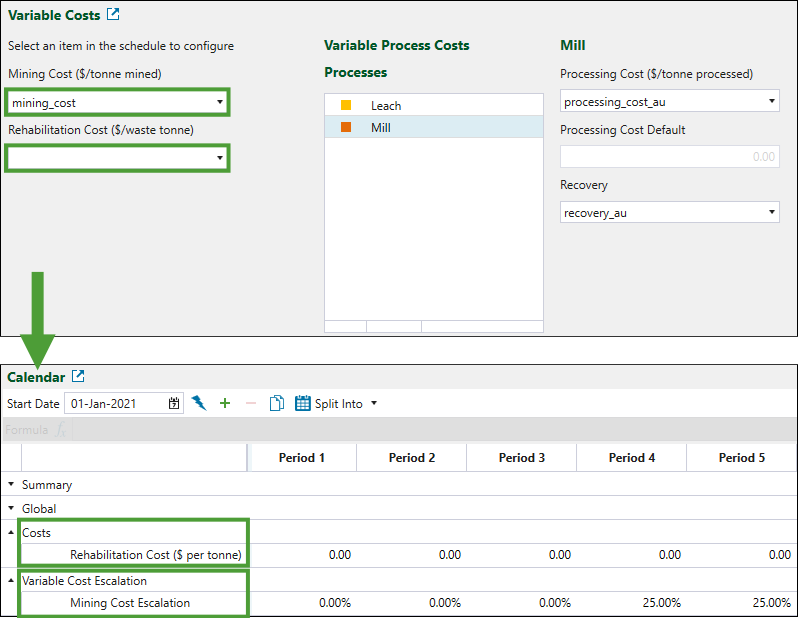
Crusher
Each crusher included in a setup is displayed separately in the calendar.
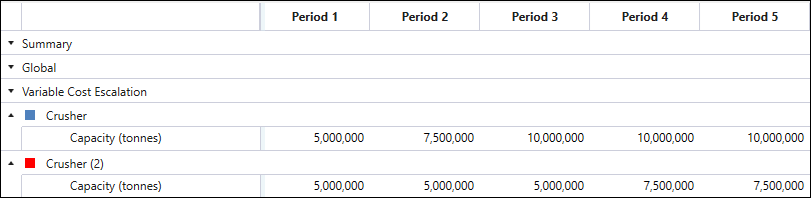
The Capacity (tonnes) parameter specifies the maximum feed tonnes the crusher can accept in a given period. A returned schedule may use less than this capacity, but never more. Enter the crusher limit of the primary crusher.
Process
Each process node in the flowchart has its own group of parameters displayed in the calendar.
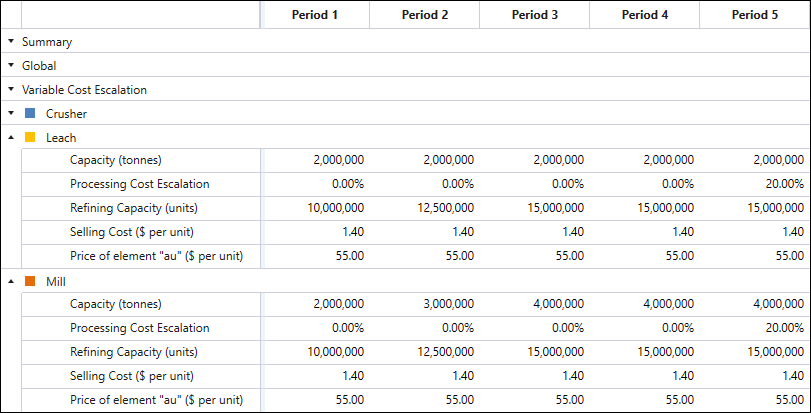
You can specify the following parameters for each process:
-
Capacity (tonnes)
The maximum feed tonnes the process can accept. A returned schedule may use less than this capacity, but never more. You can use a Process Accumulation constraint if there is a target capacity you would like to achieve. For more information, see Process Accumulation. -
Processing Cost Escalation
A percentage-based additional processing cost that you can define separately for each period. This cost is applied to every feed tonne processed during the specified period.Note: This is in addition to the processing costs specified in the
Configuration subtab. For more information, see Configuration. -
Refining Capacity (units)
The maximum amount of metal (or product) that can be produced by the process. Specify this amount in product units. -
Selling Cost ($ per unit)
The costs incurred when one unit of product is sold. -
Price of element ($ per unit)
The amount of revenue expected for each unit of product that is produced by the process.
Beneficiation Group
Each beneficiation group in the flowchart has its own set of parameters displayed in the calendar.
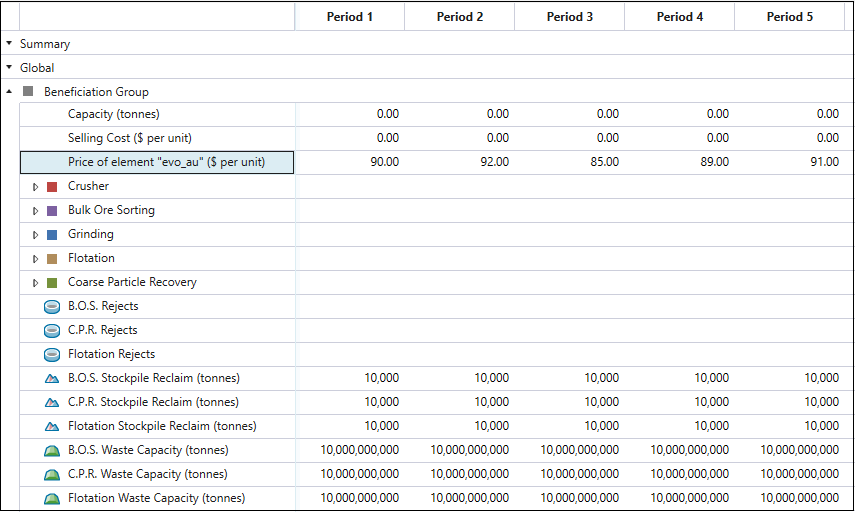
The general parameters that you can set for the whole beneficiation group are as follows:
-
Capacity (tonnes)
The maximum feed tonnes the beneficiation group can accept. A returned schedule may use less than this capacity, but never more. You can use a Process Accumulation constraint if there is a target capacity you would like to achieve. For more information, see Process Accumulation. -
Selling cost ($ per unit)
The costs incurred when one unit of product is sold. -
Price of element ($ per unit)
The amount of revenue expected for each unit of product that is produced by the beneficiation group.
Tip: Use the Expand all rows/Collapse all rows toggle button at the top-right of the calendar table to expand or collapse all the rows for the subprocesses in the beneficiation group.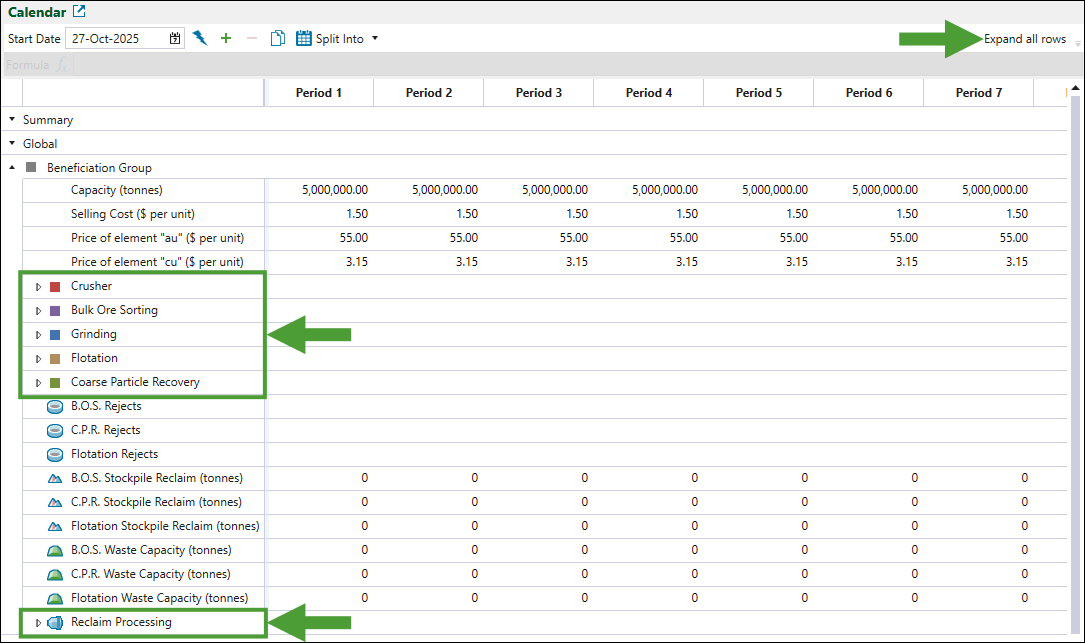
Crusher (subprocess)

You can specify the following parameters for the crusher within the beneficiation group:
-
Capacity (tonnes)
The maximum feed tonnes the crusher in the beneficiation group can accept. A returned schedule may use less than this capacity, but never more. -
Processing Cost (for Crusher subprocess)
The processing cost (in currency units) per feed tonne for the crusher in the group.
Grinding, Flotation, Bulk Ore Sorting and Coarse Particle Recovery
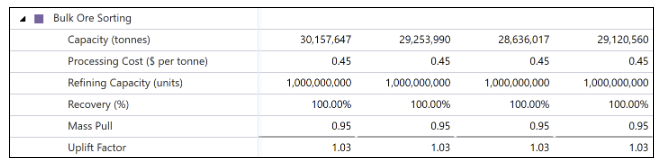
The same parameters apply to each of these subprocesses, as follows:
-
Capacity (tonnes)
The maximum feed tonnes the subprocess in the group can accept. A returned schedule may use less than this capacity, but never more. -
Processing Cost ($ per tonne)
The processing cost (in currency units) per feed tonne for the subprocess in the group. -
Refining Capacity (units)
The maximum amount of metal (or product) that can be produced by the subprocess. Specified in product units. -
Recovery (%)
The factor that is used to simulate the inefficiencies of the process. The recovery factor represents the amount of high-grade ore that is sent to the product stream, versus the grade that is specified by the Uplift Factor. A factor of 95% would result in the uplifted grade being reduced by 95%, with the rejects’ stream having its grade increased to represent high grade material incorrectly reporting to it. -
Mass Pull
The factor that specifies how much of the feed should pass to the product output stream of the subprocess. The remaining amount is sent to the rejects’ output stream. A factor of 0.95 would result in 95% of the feed tonnes flowing to the product stream, and 5% to the rejects. This can be specified as either a fixed number, or a variable in the block model. -
Uplift Factor
The factor by which the grade in the product stream is increased compared to the feed. This in turn results in the reduction of grade in the rejects’ stream. A factor of 1.05 would result in the product stream having a grade 5% higher than the feed. You can specify this as either a fixed number, or a variable in the block model.
B.O.S Rejects, C.P.R. Rejects, and Flotation Rejects
Reject material from the Bulk Ore Sorting (B.O.S.), Coarse Particle Recovery (C.P.R.), and Flotation subprocesses can be sent to either a stockpile or waste dump attached only to that subprocess. Stockpile material is then reclaimed and processed in the Reclaim Mill.

The Stockpile Proportion, which is a common parameter for the nodes that process rejects, is a factor that specifies how much of the associated reject stream should be stockpiled. The remaining amount is sent to the attached waste dump.
B.O.S Stockpile Reclaim, C.P.R. Stockpile Reclaim, and Flotation Stockpile Reclaim
The stockpiles associated with the Bulk Ore Sorting, Coarse Particle Recovery, and Flotation subprocesses must have their reclaim amount set by period. By the end of the schedule, all stockpiles must be reclaimed, hence the final period in the calendar must have a non-zero reclaim amount that is high enough for the schedule to finish within the maximum number of periods specified for that schedule. There are usually 100 periods in the schedule, but you can increase this number in the  Engine Parameters tab. See Engine Parameters for more information.
B.O.S Waste Capacity, C.P.R. Waste Capacity, and Flotation Waste Capacity
The waste dumps associated with the Bulk Ore Sorting, Coarse Particle Recovery, and Flotation subprocesses can each have an upper limit. The capacities represent the total capacity of the dump in that period, and not the increase in capacity from period to period.
Reclaim Processing

Reclaim Processing, which is a common operation for the nodes related to the reclaims within beneficiation group, comprises the following parameters:
-
Capacity (tonnes)
The maximum feed tonnes a subprocess in the group can accept. A returned schedule may use less than this capacity, but never more. -
Processing Cost ($ per tonne)
The processing cost (in currency units) per feed tonne for the subprocess in the group. -
Recovery (%)
The percentage of product or metal in the stockpile material that will be extracted by the mill. This factor allows for the modelling of inefficiencies in the mill that prevent the recovery of all metal (products) in the mill’s feed.
Pits

Note: This section appears in the calendar only when one or more beneficiation groups are added to the flowchart.
For each lithology, specify the proportion of group feed that is sent to the crusher process. The remaining amount will be sent for bulk ore sorting. You can specify this value as either a number, or a block model variable.
Stockpiles in beneficiation group

If your beneficiation group is fed by a stockpile, then a Beneficiation Group Feed section will be added under the Stockpiles category in the calendar.
For each lithology, specify the proportion of group feed that is sent to the crusher process. The remaining amount will be sent for bulk ore sorting. You can specify this value as either a number, or a block model variable.
Stockpiles

The following parameters are displayed for each stockpile that has been added to the flowchart:
-
Rehandle Cost ($ per tonne)
The cost of reclaiming one tonne of material from the stockpile to the mill. -
Recovery
The percentage of product or metal in the stockpile material that will be extracted by the mill. This factor allows for the reduction in grade or loss of material during the stockpile process. -
Maximum Reclaim
The maximum amount of the stockpile that can be reclaimed in the period. A value of 80% means that 80% of the material accumulated on the stockpile at the start of the period can be reclaimed.
