

Calculate the Expected Number of Periods for a Setup
Before submitting a job to the server, we advise that you calculate the expected number of periods to process the total number of pit tonnes in a setup. Here is a worked example.
-
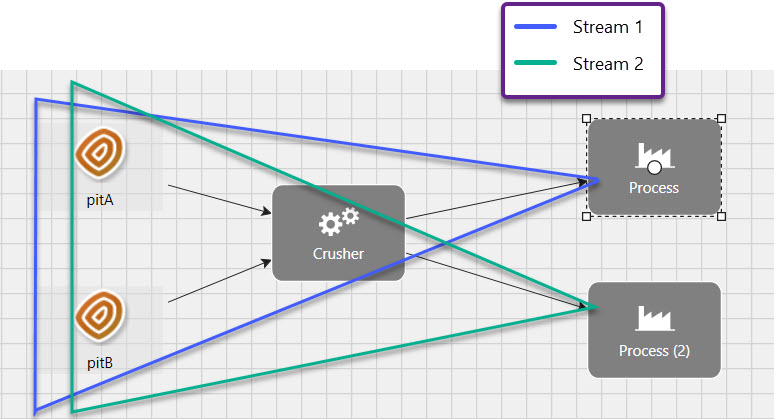
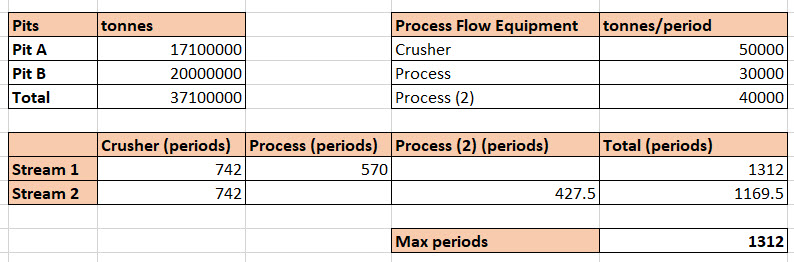
Enter the total number of pit tonnes per stream in a Microsoft Excel spreadsheet. This can be worked out by dragging your models into an empty pivot report.
-
In the same spreadsheet, enter the capacities for each processing equipment. These values are retrieved from the Calendar.
-
For each piece of equipment, calculate the number of periods required to process the maximum total pit tonnes. This is done by dividing the pit tonnes input by the equipment capacity. For simplicity, in each stream, it is assumed that all possible tonnes are going to one process (a maximum value is being calculated).
-
In the example, each stream is processed by two sets of processing equipments. To get the maximum number of periods required to process each stream, add the periods required to process the pit tonnes using the first set of equipment to the periods required to process the pit tonnes with the second set of equipment. The largest value of all the streams will be the expected maximum number of periods to process the pit tonnes.
Note: The above example applies to Strategy setups. Some constraints may result in ending the setup periods earlier. See Strategy constraints for more information.
