

View
The View group tools on the Geotechnical tab allow you to adjust your view of discontinuities to simplify analysis.

|
|
Rotate the view to look at a selected discontinuity from the front or side. |
|
|
Filter discontinuities by their dip direction, length and/or area. |
Predefined Views
The Geotechnical ribbon includes two predefined view tools for inspecting discontinuities. These tools are similar to the predefined view tools available on the View ribbon and the view window tool bar except that they orient according to the selected discontinuities, not the scan axes, and they do not zoom on a second click.
-
Click
 View Front On to view a discontinuity or the plane perpendicularly.
 -
Click
 View Side On to view in line with (parallel to) a discontinuity or the plane.
Note: Views are oriented to a plane-of-best-fit if you have selected multiple discontinuities.
Filter Discontinuities
A view may be loaded with as many as 10,000 discontinuities or more. The discontinuity filter tool allows you to hide discontinuities you are not interested in, based on dip, dip direction, length, and discontinuity area.
Filter discontinuities as follows:
-
On the Geotechnical tab, in the View group, click
 Filter Discontinuities.
 -
Select the discontinuities
 in the project explorer.
 -
Set the required filter types and parameters in the filtering tool.
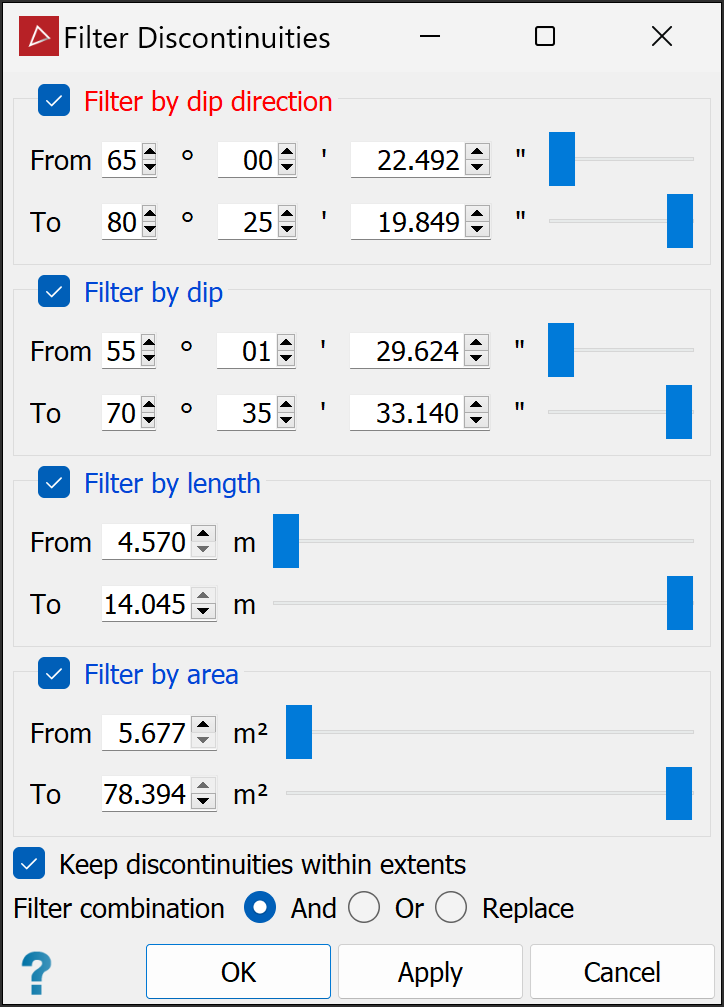
Note: If a filter type is not selected, its parameters will be ignored.
-
Click OK or Apply.
