Legend
From the  Legend drop-down menu (Home tab > Colour group), you can access both the Numeric Legend Editor and
  Text Legend Editor. The Legend button opens the numeric legend editor by default, but changes to the last one selected.
Expand below to see detail on each legend editor.
 Numeric Legend Editor
The numeric
legend editor enables you to set up colour
schemes with associated number ranges, including dimensions. Numeric legends can be applied to various data and objects for displaying
physical trends using colour schemes. You can tailor all aspects of legends according to requirements, as follows:
-
On the Home tab, from the Colour group, click
Legend, or select Numeric Legend Editor from the drop-down menu.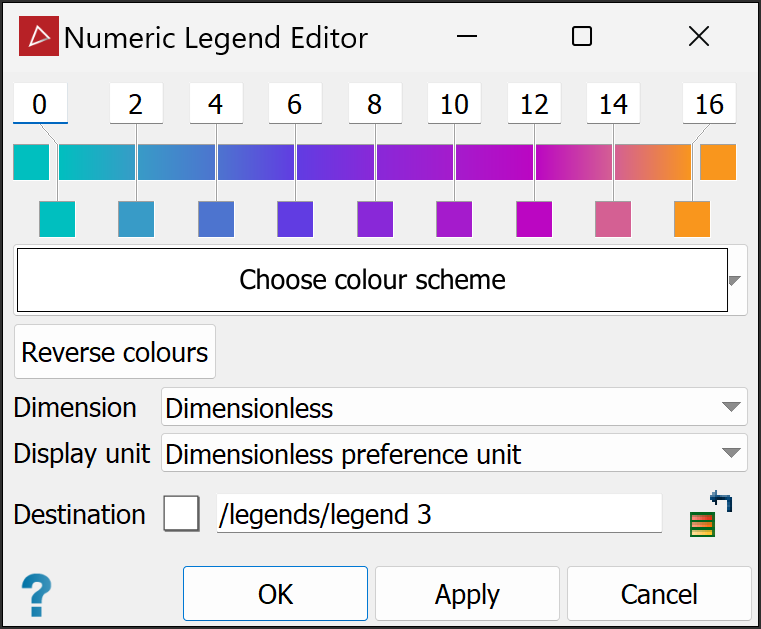
-
From the Dimension drop-down, select the relevant dimension type.
-
From the Display unit drop-down, select the units to be used.
-
Adjust the colour scale as required. See Modifying a Colour Scale for detailed instructions.
See also: Using the colour selector below for an overview of the advanced colour selector.
-
In the Destination field, specify the container in which to save the legend and enter a name.
-
Click OK or Apply.
See also Colour Scheme > Use legend for further guidance on applying legends.
Text Legend Editor
Text legends are used to create or edit sets of text names, and colours to represent the names. Create a text legend as follows:
-
On the Home tab, from the Colour group, select
Text Legend Editor from the Legend drop-down menu.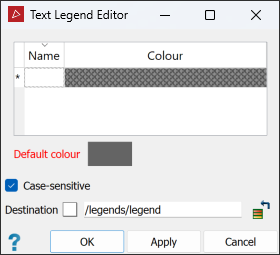
-
Select a name for the legend in the Destination field.
Tip: You can drag an existing legend into this field for editing.
-
Select a Default colour that will be applied to any undefined text by default. Single-click for the basic colour palette, double-click for the advanced colour palette (see Using the colour selector below).
-
For the first legend item, set the following properties:
-
Name: Double-click, then type the text name.
-
Colour: Double click in the field, then select a colour from the palette.
Note: You can apply any individual colour to more than one row.
When the row is complete, a new row becomes available.
-
-
Repeat step 4 for each required row.
-
You can insert or delete new rows as required by right-clicking in the table and selecting the relevant option.
-
You can also populate the table by dragging existing text legends onto it. Rows from the existing legend will be added to the bottom of the table.
|
|
|
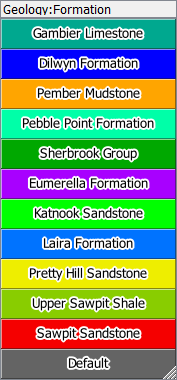
Example of a completed text legend |
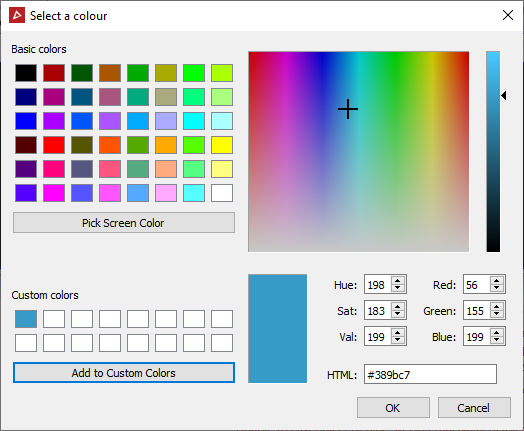
Using the colour selector
Several methods for selecting colours with the colour selector tool are available, as follows:
-
Choose a colour from the Basic colours palette.
-
Click on the spectrum box to choose a hue, then click on the intensity bar to set the colour's intensity.
-
Click Pick screen colour then a point on the display to select its colour.
-
Manually enter colour values in the Hue, Sat, and Val fields or the Red, Green, and Blue fields.
-
Enter the hexadecimal RGB colour code in the HTML field.
-
To save custom colours for later use, click Add to custom colours. The new colour will appear on the Custom colours palette.