

Multi-ID Grade Estimation
Use this option to run multiple block estimation files (.bef).
On the Block menu, point to Grade Estimation, then click Run Estimation Multi.
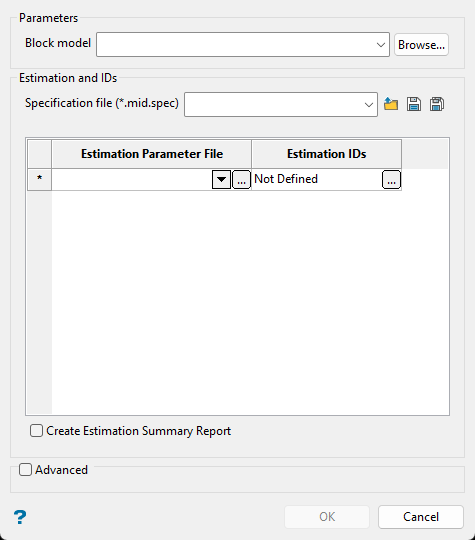
Specification file (*.mid.spec)
Enter a new specification name in the textbox to create a new file or select an existing specification file to reuse or edit parameters. Use the drop-down list to select a specification file if it is in the current working directory, or browse for it in another location by clicking the Browse button. To save your specifications, select the Save or Save As button.
-
 Browse
 -
 Save
Save -
 Save As
Estimation Parameter File
Select the estimation files from the drop-down list, or browse for them by clicking the  button.
Estimation ID
Select the estimation ID by clicking the button.
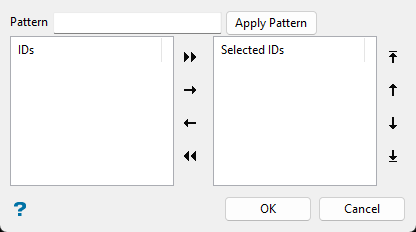
Tip: To highlight multiple list items, hold the Shift key while left-clicking for consecutive items in the list, or hold the Ctrl key while left-clicking for non-consecutive items.
To move list items from one side to another, select the item(s), then click one of the navigation buttons.

|
Move all items to right side. |

|
Move selected items to right side. |

|
Move selected items to left side. |

|
Move all items to left side. |

|
Move selected items to the top of list. |

|
Move selected items higher in list. |

|
Move selected items lower in list. |

|
Move selected items to the bottom of list. |
Pattern
Use the Pattern field at the top of the panel to highlight list items with a common naming pattern. Wildcard characters can be used. Use an * for multiple characters or a ? to replace a single character.
Create Estimation Summary Report
Select this option to create an estimation summary report (_esr.csv) with information compiled from the block estimation report files (.bef_report) for validation purposes. See Block > Grade Estimation > Estimation Summary Report for more information.
Advanced
Use this to set the number of groups that can be run in parallel.

