

Display Stations
Display survey stations
This option is the same as the Iroad > Survey > Display Stations option.
The Display Stations option to display the survey stations that are in a nominated survey station library.
Instructions
- Select Survey menu.
- Select Surveying menu
- Select Display Stations option
The following panel displays.
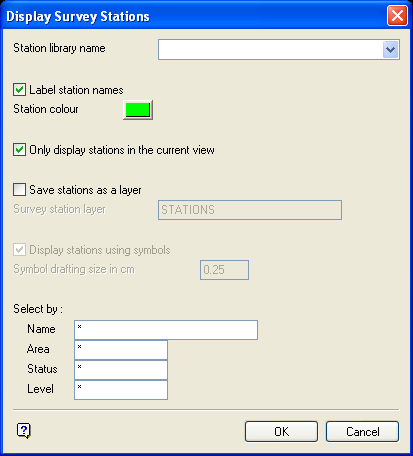
Display Survey Stations panel
Station library name
Enter, or select from the drop-down list, the name of the survey station library.
Label station names
Select this checkbox to label the stations with their names.
Station colour
Select a colour for the stations.
Only display stations in current view
Select this checkbox to display only those stations that are visible in the current view.
Save stations as a layer
Select this checkbox to save the stations in a nominated layer.
- may contain up to 40 characters,
- must begin with an alphanumeric character [
0-9] or [a-z/A-Z], - cannot include spaces,
- can include hyphens [
-], plus signs [+], underscores [_], periods/dots [.], - can include the special characters of
ÁÂÃÀÇÉÊÍÓÔÕÚÜÑthat are used in the Spanish and Portuguese languages.
If this checkbox is not checked, then the stations will be loaded as a single special object that cannot be saved.
Display stations using symbols
Select this checkbox to display the station using a symbol. The symbol drafting size is used to determine the size of the symbol on a plot. You will be prompted to select a symbol after this panel is completed.
Select by
The stations to be displayed can be selected by name, area, status and level. Wildcards (* multi character wildcard and % single character wildcard) are allowed.
Select OK.
If you selected to display the stations using a symbol, then you will need to select a symbol. Once selected, the stations are displayed with the symbol. If you are not using a symbol, then the stations are displayed as simple point markers.

