

Create from RIN
Use this option to create a Vulcan Dump file (.dmp) from a reserves inventory database. In order to use this option, the database must be stored in your current working directory.
Note: By using this option you have no control over the format of the dump file. If you want to control the formatting of the dump file, then use the remainder of the options of the Dump File Reporting submenu.
Instructions
On the Open Pit menu, point to Dump File Reporting, then click Create from RIN.
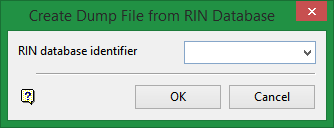
RIN database identifier
Enter, or select from the drop-down list, the database identifier of the database you want to create a dump file. It is not necessary to add the project code or the .RIN extension. The dump file will have the name <proj><odi>.dmp where <proj> is the project code and <odi> is the database identifier. This file will be stored in your current working directory.
Click OK.
The progress of the generation will display in a Report Window.

