

Edit Column Width
Use this option to refine a model by changing the width of a column. The change in width is accommodated by adjusting the width of the adjacent column(s). If the column being modified is the last column, then the adjustment is applied to the preceding column(s).
Instructions
On the Model menu, point to Modflow Grid, then click Edit Column Width.
Select a column (by selecting any cell in the column). The following panel is then displayed.
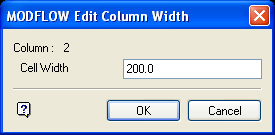
Column
Displays the number of the selected column.
Cell Width
Enter the column width. The default value is the current width.
Select OK.
The dimensions of the model are then adjusted, and the model is redisplayed. You will then be prompted for the next column to be edited. Cancel when you have finished.Edit Column Width

