

List 
Use the List option to list and load grid models (.<mv>g). The grids displayed in the list depend upon the file extensions that have been specified through the Vulcan Explorer : File Types : Grids section of the Tools > Preferences option.
.00G as your grid file extension, then only files with the .00G extension will appear in the list.Alternative loading methods are provided by the Load option, the Vulcan Explorer and the Open button  on the Standard toolbar. You can also access this option from the Open toolbar.
Instructions
On the Model menu, point to Grid Mesh Surfaces, and then click List to display the Open panel.
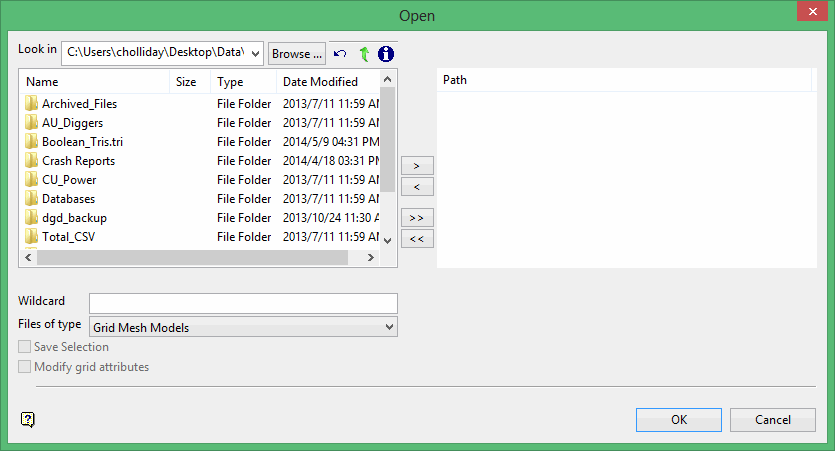
Browse for files using the Browse... button, or use the interface showing the available grid files in the current working directory.
Click on the names of the files you want to select. Use the  buttons to go to the last folder visited, go up one level, or change the way details are viewed in the window.
-
To highlight multiple consecutive files in the list, hold down the Shift key and click the first and last file names in that section of the list.
-
To highlight multiple non-consecutive files, hold down the Ctrl key while clicking the file names.
Move the items to the selection list on the right side of the panel.
-
Click the
 button to move the highlighted items to the selection list on the right.
 -
Click the
 button to remove the highlighted items from the selection list on the right.
 -
Click the
 button to move all items to the selection list on the right.
 -
Click the
 button to remove all items from the selection list on the right.
Wildcard
Enter the text to use as a filter, then press Enter. Use * for multiple characters or % to replace a single character.
Example: For example, with topo_* used as a wildcard, the result might be topo _area2_aerial, topo _min, or topo _with_pit.
Files of type
-
Grid Mesh Models
-
Selection Files
-
Pre Version 4.x Selection Files
Save Selection
Select this option if you want to save your selection choices for future use. You will be prompted to enter a name for the selection file when you click OK.
Modify grid attributes
Select this option if you want to add or delete attributes.
Click OK.
The chosen grid mesh models are then loaded as wire frames. Wire frames are transparent, i.e. they allow you to see underlying models.

