

Underlay Label Colour
Set Colour for Labels
Use the Underlay Label Colour option to set the colour for all subsequent labels.
Tip: Use the Colour option under the Design > Text Edit submenu to change the colour of labels that have been placed in a layer.
Instructions
On the Analyse menu, point to Label, and then click Underlay Label Colour to display the Select label colour panel.
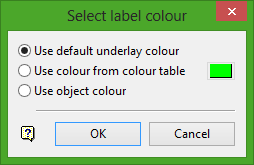
Use default underlay colour
Select this option to use the default underlay colour for the labels. The default underlay colour is set through the Graphics : Colours section of the Tools > Preferences option.
Use colour of colour table
Select this option to use a specific colour for the labels. The colour will be selected from the current colour table.
Use object colour
Select this option to use the object colour when colouring the labels.
Click OK.
Was this page helpful?
