

Set Up Local
Set Conversion Parameters for Local to UTM
The Set Up Local option to set the transformation parameters for the conversion of local grid system coordinates to UTM coordinates.
The parameters are stored in the Transformation Matrices file (<proj>.env_tran) with a nominated transformation name. The .env_tran file is stored in your current working directory.
Use the Local to UTM option to use the transformation matrix.
Instructions
- Select Survey menu
- Select Transformations submenu
- Select Set Up Local option
The following panel displays.
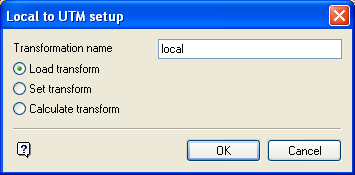
Local to UTM setup panel
Transformation name
Enter the name of the transformation. The transformation parameters will be, or are (when loading an existing transformation), stored in the .env_tran file under this name. The maximum size is 20 alphanumeric characters.
Load transform
Select this option to load an existing transformation.
Set transform
Select this option to create or edit the transformation matrix parameters.
Calculate transform
Select this option to enter coordinate data from which Vulcan will calculate the matrix parameters.
Select OK.
Load an existing transformation
Create/Edit transformation matrix parameters
Calculating the transformation
Load Transform
The transformation parameters are loaded.
Set Transform
The following panel displays.
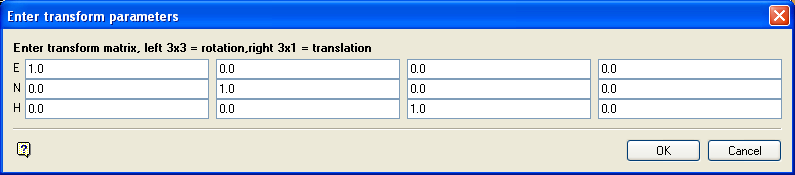
Enter transform parameters panel
Specify the transformation matrix. Refer to the Matrix option (under the Design > Transformations submenu) for information on transformation matrices.
Select OK.
Calculate Transform
The following panel displays.
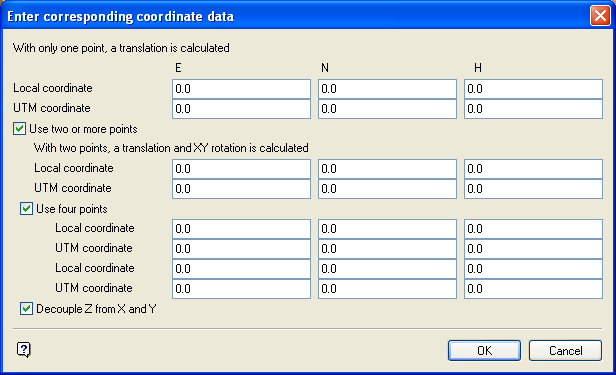
Enter corresponding coordinate data panel
This panel allows the entry of 1, 2 or 4 pairs of both local and UTM coordinates. From these sets of common coordinates, a 3 × 3 rotation matrix and a 3 × 1 block shift transformation matrix are generated.
Enable the Decouple Z from X and Y check box if you want to avoid a dependency of Z on X and Y when calculating the transformation.
Select OK.
The Local to UTM option can then be used to perform the actual conversion.
