

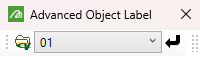
Advanced Object Label toolbar
|
Icon |
Tooltip |
Description |
|
|
Select Object Label Spec |
Opens the Choose Specification File panel to select a Advanced Object Label specification file ( Refer to Analyse > Label > Advanced Object Label for information on creating labels based on selected attributes and saving settings to a specification file. |
|
n.a. |
Spec ID |
Use the drop-down list to select the desired Scenario ID in the nominated specification file ( |
|
|
Label |
Opens the Select By dialog to select desired design data to apply the nominated Advanced Object Label to. |


Tip: To remove the Advanced Object Label from an object, right-click on the object and point to Label on the displayed context menu, then select Advanced Object Label Off.
Was this page helpful?
