

Ungroup
Use this option to clear any structural data groupings that were assigned through the Group option.
Important: Care must be taken as changes made to the structural database through the Ungroup option cannot be selectively undone.
Structural data groupings can also be cleared via the Vulcan right-click context menu. Simply right-click on highlighted structural elements and select the Geotech > Ungroup option from the displayed context menu.
Note: Rubber band selection in stereonets is only possible in plan view, i.e. rubber band selection will be disabled if the stereonets have been rotated. Use the  Reset View button (on the Graphics toolbar) to return to plan view.
Instructions
On the Geotech menu, point to Analysis, then click Ungroup.
The following panel displays.
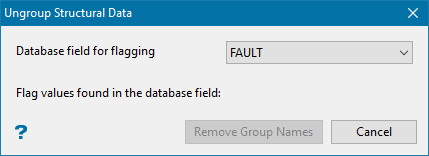
Ungroup Structural Data panel
Select the database field that has an assigned group code. The available drop-down list contains all flagging fields found in the currently open structural database.
Select Remove group name.
The Multiple Selection box is then displayed. This allows you to select the structural data by category. Upon selection, the data will be ungrouped.
