

Save Blast As
Saves blast(s) to the database allowing them to be named or re-named in the process. If more than one blast is loaded, a blast selector will be presented from which the user can select the blast(s) to save.
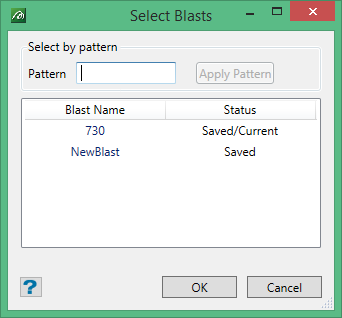
If there is only one blast loaded, this selection will be skipped and the single blast will be selected automatically. Even if a blast is unchanged (as marked Saved in the selection Status column above) it may still be selected to save, in order to rename that blast and/or replace the data source type of the current existing data on the database for that blast.
Blast Name
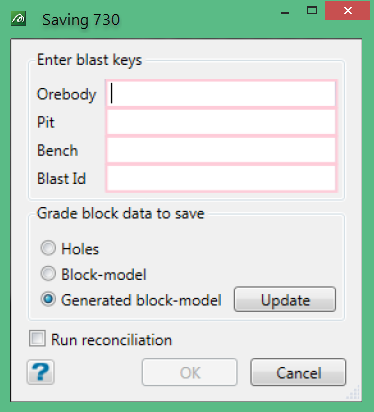
Having selected the blast(s) to save, the panel above will be presented for each of the blasts to be saved. In this, each of the values for the blast key must be specified. When running this for an existing blast, the original values will populate the fields.
Data Source Type
If there is more than one data source type being used in the data set the user will be asked to nominate which data group to save. For example, in the data set demonstrated in the panel above, all three possible data source types are in use, Holes data (internal blast holes or external drill-holes), predefined Block Model data and Generated block-model data.
As with the blast name, the user will be asked for the data-source type for each blast to be saved separately. So, one data type could be saved for one blast and a different data type for another, etc. If there is only one data type in use, this section of the panel will not be shown. That data type will be selected automatically
Reconciliation
If Reconciliation has been defined for this data set and the appropriate tables have been set up and the necessary data is available, the panel above will also contain the check box where the user can elect to run the reconciliation process. This is shown in the example data-set above.
