

Problem Solving Guide
The Design Pit/Dump option is based on manipulation of points with design strings. Problems can occur if points are too close together or angles are too acute. In most cases these can be fixed by using some minor point manipulation.
The use of global angle and distance tolerances set in the Open Cut Design submenu will alleviate most of these problems. String conditioning can also be used to aid in smoothing pit shapes, especially applying curvature to corners and straightening long walls. However, it would be unwise to blindly continue inserting roads without considering factors that will affect the actual realisation of the pit. Narrow corners should be manually edited to match the capabilities of the mining equipment.
Problems:
Road skews away from highwall
Error message "*Warning* Premature completion Case 1"
Problem
Road skews away from highwall.
Figure 1: Road Skews Away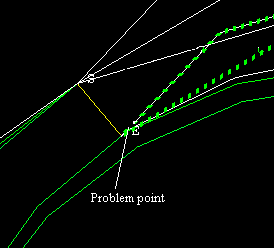
Cause
Trying to insert or continue road with another point close to the insertion point as shown in Diagram 2.
Figure 2: Problem Point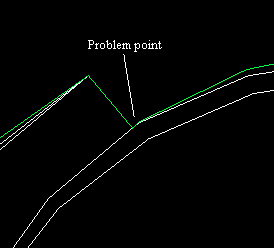
Solution 1
Delete the problem point as indicated. The point to be deleted will lie on the berm adjacent to the point of continuation of the road. The corresponding point on the previous projected string should be relimited back to the end of the road so that future triangulation models are created correctly.
Figure 3: Problem Point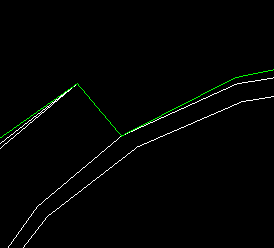
Figure 4: Corrected Road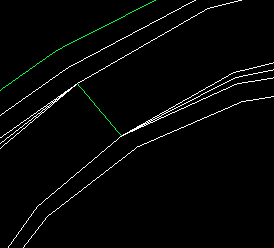
Solution 2
Enable the Proximity filter check box on the parameters panel. This will automatically remove these problem points that are closer than the plan bench distance formed by the projection.
Problem
Error message " *Warning* Premature completion Case 1 ".
Cause
When a grade is applied to a line other than the highwall, an iterative technique is used. There are some cases where it is not possible to find a solution, so an attempt is made to place the road in the correct position which may not be at the nominated grade. This can be adjusted by using the "Increase/decrease grade" option presented when asking to accept the inserted road.
Solution 1
If the road looks okay and the grade indicated in the Report Window of Vulcan is accessible, then "Accept" the road. This is a warning to indicate that no solution cold be found for that particular geometry.
Solution 2
If the road has appeared to veer off to nowhere land, then make sure there are no points on the original string close to the insert point. The use of the "Proximity filter" should remove these problem points.
