

New Estimation Run File
Create a Block Estimation Run File
Use the New Estimation Run File option to create a new block estimation run file (.ber). The format of the created block estimation run file is <filename>.ber. The created.ber file, which is an ASCII variant file, is stored in the Other directory of the Vulcan Explorer.
Instructions
On the Estimation menu, click New Estimation Run File to display the New Estimation Run File panel.
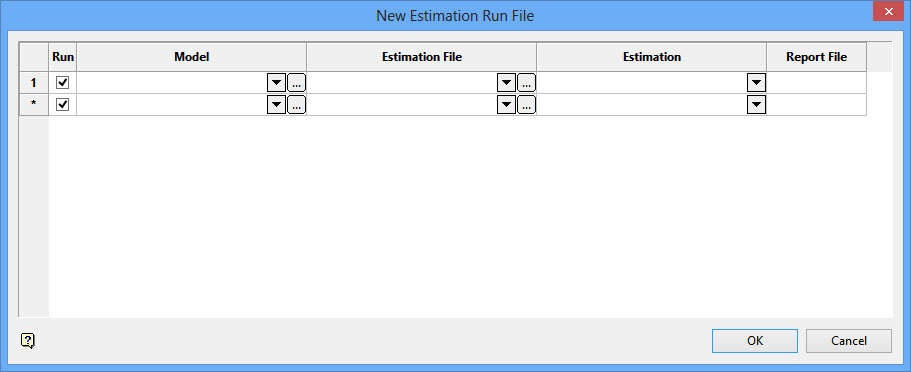
Run
Select this check box to run the estimation.
Model
Enter, or select from the drop-down list, the name of the block model on which the estimation is to be run. Use  to select a block model from another directory.
Estimation File
Enter, or select from the drop-down list, the name of the block estimation file (.bef) that contains the estimation that you want to perform. Use to select an estimation file from another directory.
Estimation
Enter, or select from the drop-down list, the name of the desired estimation.
Report File
Enter the name of the resulting estimation report file. The resulting report, which will be stored in your current working directory, will use the following naming convention:
<report file>_report
If a file name is not specified, i.e. the Report File cell is left blank, then the resulting report file will be named using the following naming convention:
<estimation file>_<estimation id>_report
Click OK.
The standard Save As panel is then displayed.
Specify the name of the new run file, as well as the location to which it will be saved.
An existing.ber can be selected, however, the new settings will overwrite any existing information.
Click Save to continue.
If you selected an existing run file, then you will need to confirm that you want the previous information replaced.
Select the Execute Estimation Run File option to run the nominated estimations and their corresponding estimation parameters.
